Microsoft Power Platform is a low-code platform for rapidly building custom, end-to-end business solutions. It consists of five product areas:...
15 October 2024
Lire cet article en Français
Using YAML in Power Apps

Microsoft Power Fx is the formula language used in Canvas Power Apps and Model Driven Apps. Recently, the YAML format was integrated into Power Fx to improve management of formulas and configurations. This article explores how and why YAML is used in Power Apps.
We recommend reading Microsoft’s Power FX documentation for further information
What is Power Apps?
Power Apps is a suite of services and connectors, as well as a data platform that provides a rapid development environment for creating customized apps tailored to specific business needs. With Power Apps, users can design apps with minimal code, thereby reducing development time and improving productivity.
There are two main app types in Power Apps: Model-Driven apps and Canvas apps, each of which meets specific needs:
- Model-Driven apps are designed for complex scenarios, where data and business processes are central. They automatically generate an interface based on the underlying data structures, such as those found in Microsoft Dataverse, and are particularly well suited to automating complex business processes like CRM systems.
- Canvas apps, on the other hand, enable totally customized, flexible design. They grant users total freedom in terms of layout and interface customization, while allowing connection to a variety of external data sources, such as SharePoint, SQL Server, and even Excel.
A key feature of Model-Driven apps is that they make it possible to use custom pages. These custom pages offer the best of both worlds, enabling integration of canvas-type components into a Model-Driven app.
See Microsoft Learn’s Microsoft Power Apps documentation
What is Power Fx?
Power Fx is an open-source formula language developed by Microsoft, used mainly in Power Apps to create canvas apps. Designed to be simple, flexible, and powerful, Power FX users can define app logic in a declarative and intuitive way.
Examples of using Power Fx
Conditional text

In the example above, the Power Fx code checks whether the text in the “TextInput1” control is empty, using the IsBlank() function. If no text has been entered, the message displayed will be “Please enter text,” otherwise the message will be “Thank you for your text.”
Changing the color of a button based on a condition

In the second example, we’re checking whether the text value of the “TextInput1” control is greater than 100. If so, the text will appear in red; if not, in green.
What Is YAML?
YAML (YAML Ain’t Markup Language) is a human-readable data serialization language frequently used for configuration. Being very simple and clear, it’s a popular choice for app configuration.

Why use YAML in Power Apps?
With the adoption of YAML in Power Apps, the goal is to standardize and simplify the way formulas are defined and manipulated. YAML has several benefits:
- Readability: the YAML format is easy to read and write, making it understandable even to non-technical users.
- Compatibility: there are numerous tools and libraries available for working with YAML, making integration and automation easier.
- Flexibility: YAML enables a hierarchical data structure, providing a great deal of flexibility for organizing formulas and configurations.
YAML formula syntax in Power Fx
When writing YAML formulas in Power Fx, it’s essential to understand certain specific conventions and syntax:
- Single-line formulas: these are written using the structure “Name: =Expression.” The space between the colon and the equals sign is crucial so that YAML does not interpret the expression as a numeric value or other implicit type.
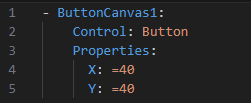
- Multiline formulas: multiline formulas can be used for long or complex expressions. This makes formulas easier to read and manage. Here is an example:

In this example, the “|” symbol indicates that the following content is a multiline text string. The indentation on each expression line must be done correctly to maintain the structure of the formula.
- First equal sign: to avoid conflicts with YAML’s implicit typing rules, every formula begins with an equal sign (“=”). This ensures that the expression is processed correctly by Power Fx without being altered by YAML analysis.
Using YAML in real-life scenarios
In practice, YAML can be used to define complex app configurations in Power Apps. For example, an app can use YAML to configure user interface controls, define actions to take in response to user events, or even to specify data bindings.
Example: retrieving a snippet from a library.
The goal is to create a library of reusable snippets (small pieces of code) to make app development easier and faster. This method lets you avoid rewriting recurring elements and improves productivity.
Let’s take the example of a button configured with the Power Fx Launch function that redirects to a website. This code is already available as a snippet in a YAML file stored on GitHub.
To use it, simply retrieve this file, copy the corresponding snippet, then paste the code directly into the app you are working on. This approach allows you to quickly integrate ready-to-use features without having to redevelop them manually.
1. Code retrieved on GitHub from VisualStudio :

2. Code pasted onto the page :
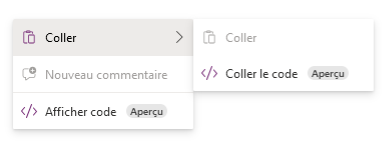
3. Correctly integrated snippet :
Key takeaways for YAML in Power Apps
The integration of YAML into Power Apps via Microsoft Power Fx takes formula and configuration management to a whole new level. It simplifies certain aspects of development and makes apps easier to understand and maintain for experienced users. However, while this feature can greatly improve efficiency for professional developers, a certain familiarity with programming languages is still needed.
This can be challenging for some “Citizen Developers,” who often aim to create solutions without going into complicated technical details. Consequently, mastering YAML is a valuable skill, but it also requires an appetite for more technical concepts.
Do you need help with your digital transformation projects with Power Platform? Contact us!