In this fifth and penultimate article in a series devoted to the benefits of having an integration platform within an...
17 September 2024
Lire cet article en Français
DevOps and AIS: What is the Right Strategy for You for Optimizing Your Azure Integration Platform?

In our previous article, “How Can You Use AIS to Adapt Your Integration Platform to Azure Services?” we presented the various services Azure offers to build a modern integration platform. In this new article, we’ll explore how DevOps principles support these services and this platform. We’ll be highlighting the various DevOps tools at our disposal, as well as CI/CD (continuous integration and continuous deployment) strategies and associated best practices, ensuring smooth collaboration between teams and fast, reliable delivery of solutions to end users.
What DevOps principles apply to our Integration platform?
DevOps principles form a set of methodologies aimed at transforming the way development and operations teams collaborate and deploy solutions. This modern approach favors automation, continuous integration, continuous delivery, infrastructure as code (IaC), and system monitoring to ensure faster deployments while guaranteeing reliability.
DevOps principles generally include:
- A culture of collaboration and communication: foster a culture where development (Dev) and operations (Ops) teams work together (as one team) seamlessly and collaborate effectively.
- Automation: automate development, testing, deployment, and infrastructure management processes as much as possible to improve efficiency and reduce human error.
- Continuous Integration (CI): integrate code changes frequently into a shared repository and follow up with a series of automated tests to detect problems quickly.
- Continuous Delivery (CD): ensure that every code change that passes automated testing is deployed quickly, reliably, and consistently across all environments.
- Infrastructure as Code (IaC): manage and provision infrastructure automatically and reproducibly, using code rather than manual processes.
- Monitoring and feedback: continuously monitor the performance of applications and infrastructure in production and use the data to quickly identify and resolve problems. A separate article on this subject will be published soon.
Deployment of legacy solutions like BizTalk is primarily manual and semi-automated, involving several distinct steps for preparation, artifact management, configuration, and deployment. Developers run tests locally, create their deployment packages, then do deployments manually or via scripts. It’s also common for component configuration to be manual, with direct supervision and management in production. Rollbacks are complicated and often require manual restores.
These methods are limited in terms of scalability, time, and total automation, slowing down deployments and making them more prone to human error.
Moving to the cloud with solutions from the Azure Integration Services (AIS) suite enables complete automation of deployments, whether of infrastructure or workloads, thereby reducing errors and manual effort. This offers automatic scalability, dynamically adapting to workloads without complicated infrastructure management. Configurations become simpler and more accessible. Deployments are faster, more modular, and more reliable, which improves responsiveness to market requirements. What’s more, maintenance is simplified through service management by the cloud provider.
On the subject of DevOps and the principle of deployment automation, it’s important to distinguish between two aspects, whether the context is integration platforms or, more generally, workload deployment in the Cloud: deployment of the application and deployment of the infrastructure hosting our application.
It’s advisable to separate the two to avoid dependency between them. This will enhance platform scalability, since these two aspects have different life cycles. It also improves security by fine-tuning access and permission management, as well as facilitating error handling and incident recovery. Let’s start by looking at how to deploy your infrastructure, and then we’ll focus on your applications.
How to deploy your integration platform infrastructure
Infrastructure as Code (IaC) is a method of managing infrastructure using configuration scripts, rather than manual processes. This approach automates the creation and management of resources, which minimizes human error and increases efficiency. Configurations are versioned, making it easier to collaborate and track changes. IaC ensures consistency and repeatability of environments, whether for development, testing, or production.
Today, all AIS services can be deployed via scripts, using one tool or a combination of them.
The main tools include:
- Terraform:
- Description: open-source tool that uses the HCL language to manage infrastructure.
- Usage: deployment via the Terraform command line.
- Bicep:
- Description: simplified deployment language for Azure; a more readable and easier-to-write alternative to JSON ARM templates.
- Usage: deployment via Azure CLI or PowerShell using .bicep files.
- Azure Resource Manager (ARM) Templates:
- Description: uses JSON files to declaratively define and deploy Azure resources. ARM templates enable integrated management and consistent deployment of resources.
- Usage: deployment via the Azure portal, Azure CLI, or PowerShell.
- Azure CLI:
- Description: command-line interface provided by Microsoft to interact with Azure. Allows you to create, configure, and manage Azure resources via command lines.
- Usage: deployment via terminal or shell scripts.
- Azure PowerShell:
- Description: PowerShell module dedicated to Azure, enabling resource management using Azure-specific PowerShell cmdlets.
- Usage: deployment via PowerShell scripts.
Organizing your Infrastructure as Code (IaC) scripts into distinct modules for each component (API Management, Logic Apps, Service Bus, etc.) is crucial to maintaining efficient, scalable infrastructure management. This modular approach enables each component to be deployed, reused, and tested independently, which simplifies upgrades and maintenance. The modules, whether developed by your team or your company, ensure that resources adhere to predefined standards. Using Azure policies in conjunction with modules can reinforce these standards.
Alongside the modules, using environment-specific configuration files ensures that deployments are adaptable and consistent across different contexts (development, test, production).
This separation facilitates collaboration by enabling different teams to work on separate parts of the infrastructure without causing interference.
Below is an example of modular organization of a Terraform project that can be broken down into different deployment layers:

To test Infrastructure as Code (IaC) scripts, the file syntax can be validated with integrated tools such as Terraform validate or az bicep build. For deployments, running scripts in test environments is recommended to check that they’re working properly before they go into production.
The configuration of continuous integration (CI) pipelines makes automating tests for each code change possible. Deployments can also be automated via pipelines in tools like Azure DevOps, GitHub Actions, Jenkins, GitLab, and others.
Key points to remember:
- IaC templates enable the deployment of 1 to n ISO environments (or near-ISO for undersized DEV environments, for example);
- Use modules and templates to organize and automate Azure resource deployment. The modular approach enables components to be deployed by layer, logical grouping, and so on;
- Use a version control system (e.g., Git) to manage IaC scripts;
- Set up continuous integration and continuous deployment (CI/CD) pipelines to automate the testing, validation, and deployment of IaC scripts;
- Centralized management of environment variables and secure management of secrets are recommended;
- It’s important to test your infrastructure scripts before deploying them to avoid any regression.
Although tools like ARM and Bicep offer specific advantages in the context of Azure, we recommend Terraform for its flexibility and advanced features. As an open-source tool, Terraform enables multi-Cloud and multi-provider management for a more universal and scalable solution for complex infrastructure needs. Its syntax is also often considered more readable and easier to understand than JSON files in ARM templates or the PowerShell language, for example.
How to deploy integration platform applications
We just discussed infrastructure deployment, which consists of one-time deployments to initialize and upgrade a platform’s services. In this section, we’re going to focus on the deployment of the application part. This involves deploying and configuring the applications needed to run workflows and business processes on the existing infrastructure.
Deploying the applications hosted by our integration platform requires the use of various tools and languages, due to the diversity of the technologies and solutions we use. For some services, we can take advantage of the tools offered by Microsoft, for example, for deploying APIs in API Management, which offer considerable customization possibilities. For services like Service Bus, which has no turnkey solution and for which we want to avoid using the Azure portal, we need to use tools like PowerShell or Terraform.
For the various AIS solutions, below are the main tools that can be used:
- API Management:
- APIOps: this community-developed, OpenSource solution applies GitOps and DevOps concepts. It can be used to extract API definitions from an API Management instance and to publish APIs, while respecting DevOps principles (versioned source code, validation of changes using Pull-Request, etc.).
- Another solution: another option for publishing APIs in API Management is to use PowerShell scripts. However, they are more complex to implement and maintain than the APIOps solution.
- Logic Apps:
Here we need to distinguish between Consumption (multi-tenant) and Standard (single tenant) logic apps, which have different deployment templates.
- Consumption: infrastructure and applications are deployed at the same time. Tools such as ARM templates, Terraform, and Bicep scripts can be used. It’s also possible to extract the deployment template using the Get-LogicAppTemplate command, after installing the ARM client tool
- Standard: use of CI/CD pipelines with specific commands. See this Cellenza blog post for more details.
- Function Apps: as with Standard logic apps, a CI/CD pipeline is used. The pipeline needs to include steps to build the .NET project, run tests (if defined), and deploy the generated artifacts to Azure Function Apps using specific tasks, such as the AzureFunctionApp@2 task.
- Service Bus/Event Grid: for an automated way to deploy Queues, Topics, or Subscriptions in a Service Bus or Event Grid instance, either ARM templates, Terraform scripts, or Azure CLI commands are mainly used. These scripts are often integrated into the integration solution that will use these components, such as Logic Apps or Azure Function.
- Data Factory: for deployment in Azure Data Factory, CI/CD pipelines are used to transfer Data Factory pipelines, in ARM template format, between different environments (development, test, production). Development is carried out in a collaboration branch, then deployment is in test and production environments with the publish branch.
Secrets required for APIs or integrations should be published directly to the Key Vault to automate secret management and avoid manual intervention after deployment.
Below is a diagram showing an example of a CI/CD chain for deploying infrastructure and applications, with the various project validation roles:
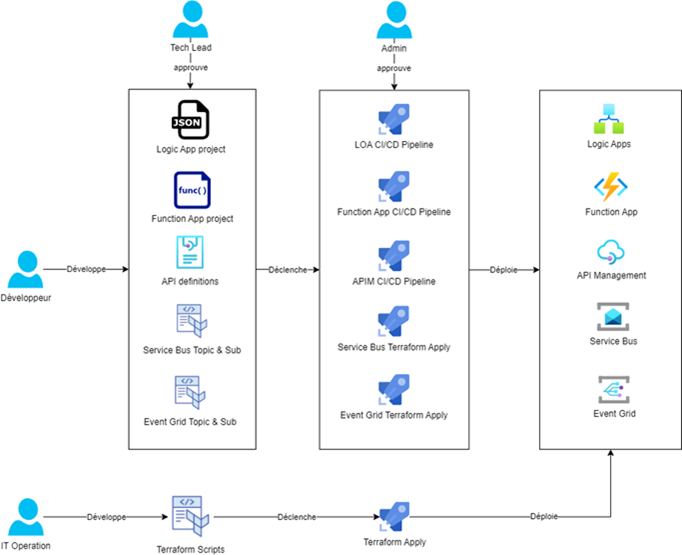
The repositories containing the source code are separate for each integration solution: one repo for API Management (APIM), another for each logic app containing the workflow(s) (including connectors and external services such as queues and topics), and the same for Function Apps.
Tests can be automated using a variety of tools, such as Postman for APIs in API Management or xUnit for unit tests on Function Apps. These test tools can be integrated with different systems, but we generally recommend Azure DevOps or GitHub Actions because of their compatibility with the Azure ecosystem. Other tools, like GitLab and Jenkins, are also available on the market.
Key points to remember:
- It’s important to automate deployments as much as possible to keep manual intervention and human error to a minimum;
- Segment the pipelines, with CI (Continuous Integration) pipelines for packaging applications and automating testing and CD (Continuous Deployment) pipelines for deploying code in different environments;
- Ideally, deploy by workload or by interface for better management and greater flexibility;
- Use a separate repository for each solution or application to maintain a clear and structured organization of the source code;
- Ensure secure, centralized management of environment variables and secrets to protect sensitive information and facilitate configuration management.
Challenges and best practices
Although Microsoft and the community regularly come up with new solutions to improve the DevOps experience surrounding Azure Integration Services (AIS), there are still some challenges that teams may find themselves facing when implementing complex solutions. In this section, we discuss some of the challenges that can arise and highlight best practices for overcoming them in order to optimize the efficiency and robustness of DevOps processes.
Challenges
Below are some of the challenges teams face:
- Different solutions and languages for deploying the applications for each Azure Integration Service;
- Technical deployment constraints that can impact existing systems and lead to downtime;
- Complex management of deployment branches for some services (e.g.: Data Factory);
- An integration team that should have good DevOps/Git knowledge;
- Some DevOps tools evolve rapidly and are maintained by the community;
- The implementation of tests is sometimes complex for certain services.
Best practices
Here are a few best practices you should think about adopting:
- Version all code, whether infrastructure scripts or application code (e.g., Git tool);
- Configure all environment variables and manage them centrally (e.g.: Azure DevOps Libraries);
- Implement a clear and defined branching strategy (e.g., Git workflow based);
- Make code review mandatory (e.g., use branch policies in Azure DevOps with Pull Request requirement);
- Configure manual validation of deployments, especially for Production;
- Define a test strategy for infrastructure and applications;
- Document infrastructure and application code (e.g.: Azure DevOps Wiki).
Key takeaways
In conclusion, integrating DevOps principles into Azure Integration Services (AIS) management is a major step towards greater efficiency and reliability in the development and deployment of Integration solutions.
The transition to modern methods like Infrastructure as Code (IaC) and CI/CD pipelines not only makes automating processes easier, but also helps eliminate human error, while optimizing the scalability and maintainability of solutions.
There are still some challenges, linked to the diversity of deployment tools and to complex deployment branch management for certain tools. To overcome these obstacles, staying on top of developments proposed by Microsoft and the community is crucial, as is adopting best practices, including code versioning and implementation of clear branching strategies. Always bear in mind that the purpose is to fully automate deployment processes, including shared infrastructure creation, code deployment, and environment variable configuration. By following these recommendations, the AIS integration platform will be able to take full advantage of the benefits of DevOps practices.
In the next article, we’ll take a look back at the monitoring of solutions and flows within our AIS integration platform, exploring best practices and essential tools for ensuring complete visibility and proactive management of performance and incidents.
Interested in learning more about developing a modern integration platform? Contact us or read the other posts in this series:
- Why Develop a Modern Integration Platform?
- Why Use Azure Integration Services?
-
How Can You Use AIS to Adapt Your Integration Platform to Azure Services?
-
How to Supervise Your Integration Platform: Challenges and Best Practices
Need to know more about modern integration? Feel free to contact us!