In this fifth and penultimate article in a series devoted to the benefits of having an integration platform within an...
11 April 2024
GitHub Copilot: Feedback From an Expert

Developed by GitHub and OpenAI, professionals are calling GitHub Copilot a “revolutionary tool for developers,” since it combines Artificial Intelligence and collaborative programming to improve both the efficiency and quality of code.
GitHub Copilot speeds up development by making real-time suggestions as you write code. It usually adapts these suggestions to suit the context and your own coding style. This lets you concentrate on more creative aspects of development, while automating repetitive tasks. Last but not least, it’s available for several development environments, including Visual Studio Code, Visual Studio, JetBrains, and Neovim.
Having used the pre-release version in 2021, which I thought was an improved code completion tool, will this new version based on the GPT4 model really deliver on its promise of efficiency? Will it be up to the task?
To get the most out of GitHub Copilot, you need to set yourself an achievable goal—one that will be genuinely useful. For some, that goal will be to improve code, reduce technical debt, refactor code, and fix bugs. Others will want to learn new platforms, new languages, add features, and so on. GitHub Copilot has been trained on billions of lines of code from public GitHub repos; there are possibilities galore.
My goal is twofold:
- Learn a new language—in this case Python—to bring myself up to speed with the team I’m working with;
- And do so on a topic the team will find useful.
If you’d like to learn more about GitHub Copilot, here’s a link to a trial license (Getting started with GitHub Copilot – GitHub Documentation). Alternatively, there are Individual, Business, and Enterprise licenses to be had.
Using GitHub Copilot
In this post, we’ll be using GitHub Copilot with Visual Studio Code. Here’s what it offers:
- Inline suggestions:
- As you write your code, Copilot provides inline suggestions to help you code more efficiently.
- Accept suggestions by pressing the tab key.
- You can also use code comments to specify the type of suggestions you’re looking for.
- Chat features:
- Copilot Chat lets you interact with Copilot via a chat interface.
- Use chat to ask for help, generate or refactor code, comment on documentation, or create unit tests.
- Solve errors or ask questions about your code.
- Discover and configure your VS Code configuration using chat functions.
- Commands:
- /doc: add documentation.
- /explain: get explanations about the code.
- /fix: propose patches for the selected code.
- /tests: add tests
- /help: access Copilot Chat for assistance
The Importance of the Prompt
Since you can write or speak to GitHub Copilot in natural language, the accuracy of your request is crucial in ensuring that it provides you with the best possible response.
The following basic principles will help you in this task:
- Always focus your prompt on a single, well-defined task or question. This clarity is essential to get accurate and useful answers from GitHub Copilot.
- Make sure your instructions are explicit and detailed. Being specific means more precise and more applicable code suggestions.
- At the same time, prompts should be concise and to the point. This balance ensures clarity without overloading Copilot or complicating the interaction.
- Use descriptive file names and keep associated files open. This provides GitHub Copilot with a rich context, resulting in more suitable code suggestions.
For more information on this subject, take a look at the Microsoft documentation: Introduction to prompt engineering with GitHub Copilot – Training | Microsoft Learn
The Project
The goal of our example project is to validate a JSON Web Token (JWT) when calling a REST API to authorize—or not—the execution of a method. Validation must be done outside the method call and systematically before each call. Here are the steps:
- Set up the development environment
- Understand and create a Python project tree
- Create and run a REST API
- Add code for token validation
- Add tests
- Comment the code and add documentation in Markdown format
Development environment
To ensure that this project ran smoothly, I used a devcontainer reduced to its simplest form with Visual Studio Code.

Creating a container containing python version 3.11 and installing the Copilot and rest-client extensions
With the Devcontainer created, we have access to the Python runtime environment: no need to install it locally.
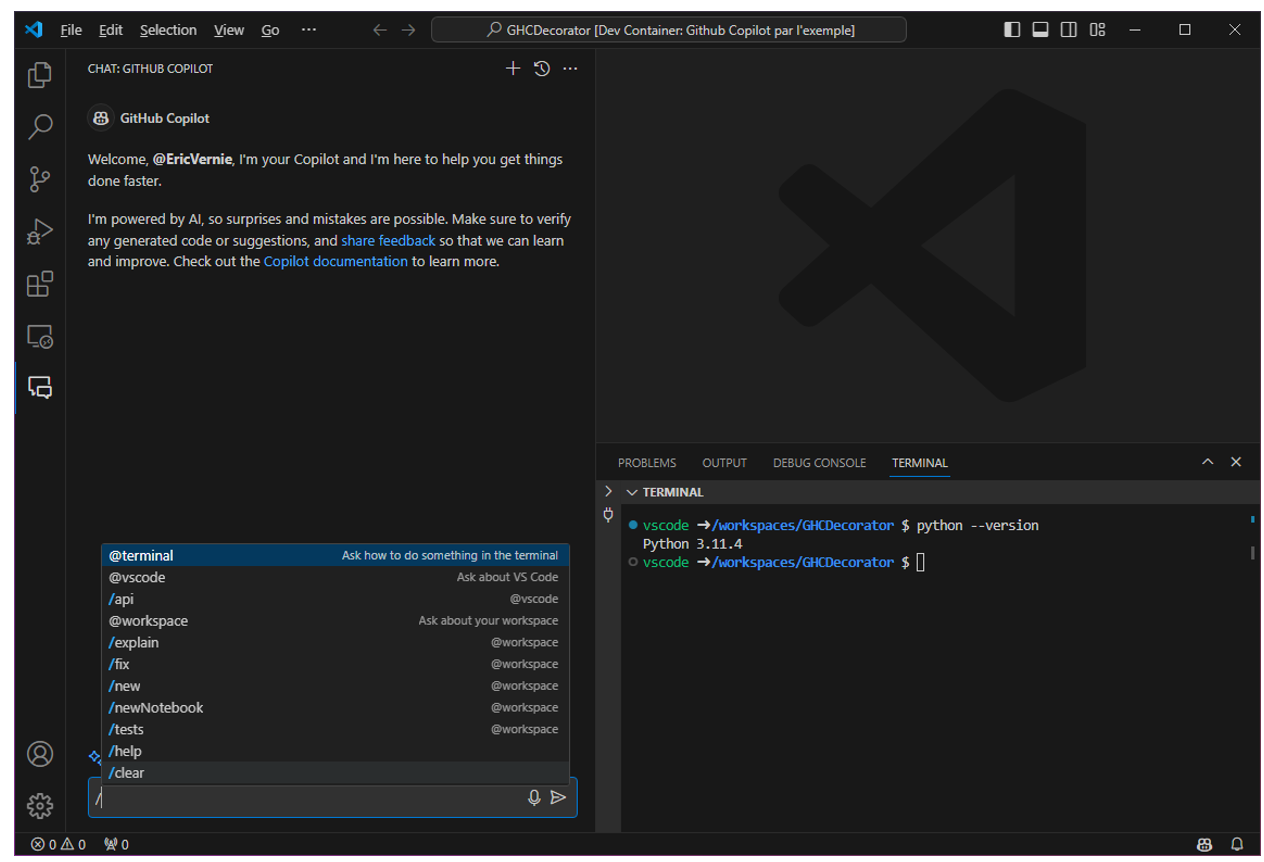
Understanding and creating a Python project tree
Before me is a blank page: there are no files in my project yet, and seeing as I want to get off to the best possible start, my first requests will focus on discovering and creating the basic structure of a Python project.
Q: What is the typical structure of a Python project?

The result is quite satisfying. Not only does it describe the structure of the project, but also communicates essential information about the Python environment itself.
To learn more, we could ask it the following questions:
Q: Tell me more about the virtual environment.
Q: What is the most popular library for testing?
Q: What is the command for installing dependencies?
You can also specify your intentions using keywords in Visual Studio Code.
For example, I’d like to ask GitHub Copilot to create the Python project tree.
Q: @workspace /new Can you build me a typical python project tree with the necessary files?

Adding @workspace /new allows Copilot to directly suggest a Visual Studio Code command to create the project structure (and I’m happy to oblige).
An alternative is to ask this question.
Q: Is there a tool for creating a Python project structure?
The answer is yes:
pip install cookiecutter and cookiecutter https://github.com/audreyfeldroy/cookiecutter-pypackage.git
Creating and running a REST API
From my blank page, I’m starting off on a good initial footing; I say “initial,” because you always need to have a trained eye check over anything generated, especially in the learning phase.
Now that the tree structure and the first necessary files have been created, I’ll be able to start coding, or rather I’ll ask GitHub Copilot to do it for me.
Q: What’s the most popular library for a REST API?
Notice that I didn’t specify Python, because logically the tool is now able to understand my intentions, realizing that it’s in the context of Python that I’m asking the question.
GitHub Copilot tells me that Flask-Restful is the most popular today. Thanks Copilot, that’s all I wanted to know! I then open my empty main.py file.
Q: Can you write me a Hello World! entry point with Flask?
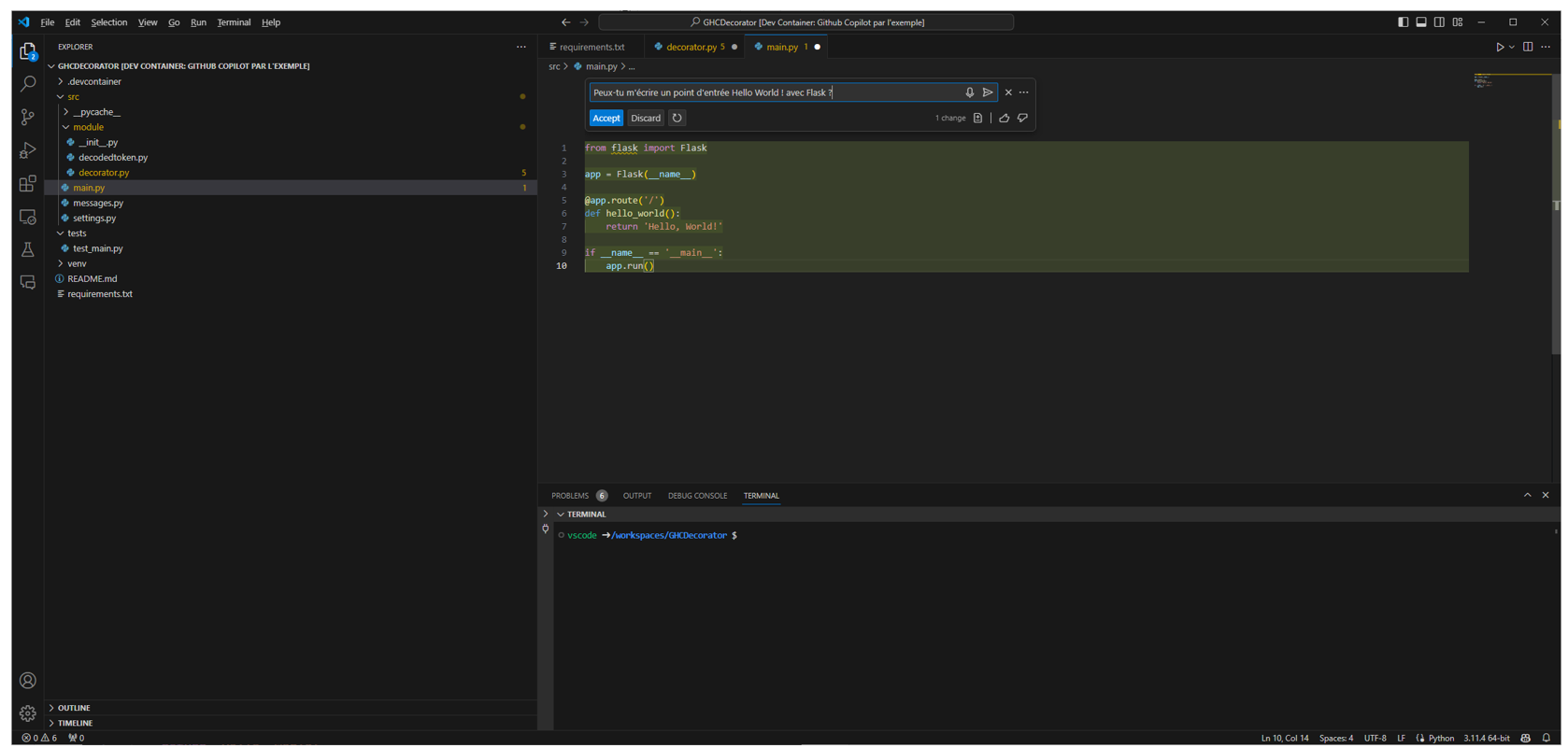
Copilot makes a suggestion that we may or may not accept. I imagine the code is correct, and it looks like a code structure I already know in other languages.
We can see in the editor that some lines are underlined: it’s possible to ask GitHub Copilot to correct the problem or explain how to do it.
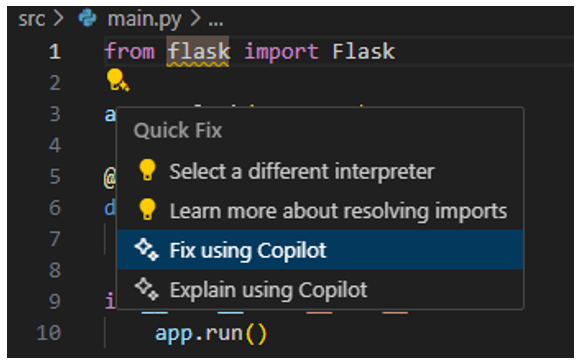
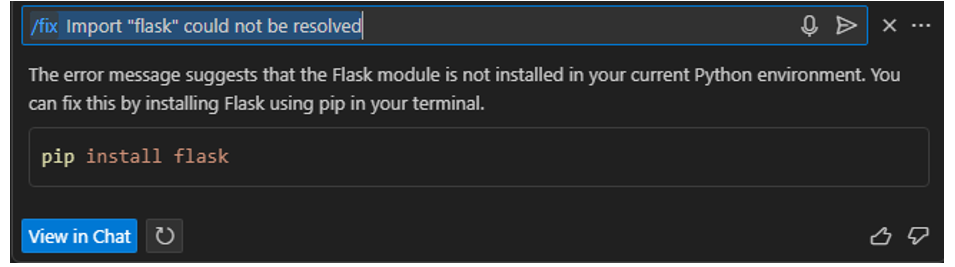
It replies with an answer we might have expected: it’s a matter of installing dependencies. What’s really important here is that it communicates a vital piece of information when we’re in the learning phase: the command line to use to install dependencies. Let’s not waste any more time!
Add code for token validation
Hello World is nice and all, but can Copilot go a step further and help me with a real situation: validating a JWT token?
To do this, we’ll need to help it by clearly explaining my intentions precisely, concisely, and briefly. For example, in a file named decorator.py let’s add the following comments:
Now we just leave the file open and ask it to propose a solution.
Q: Write a decorator that validates the token

Not only does it give me the structure of a Python Decorator, but it also suggests in its reply—as a comment in the image above—that I create a method that decodes a JWT token.
At this point, I’d like to draw your attention to the fact that I don’t know Python at all. On the other hand, I know how a JWT token is made. So, I’m going to clarify my request, as shown below.
Q: Write a method that decodes a JWT token
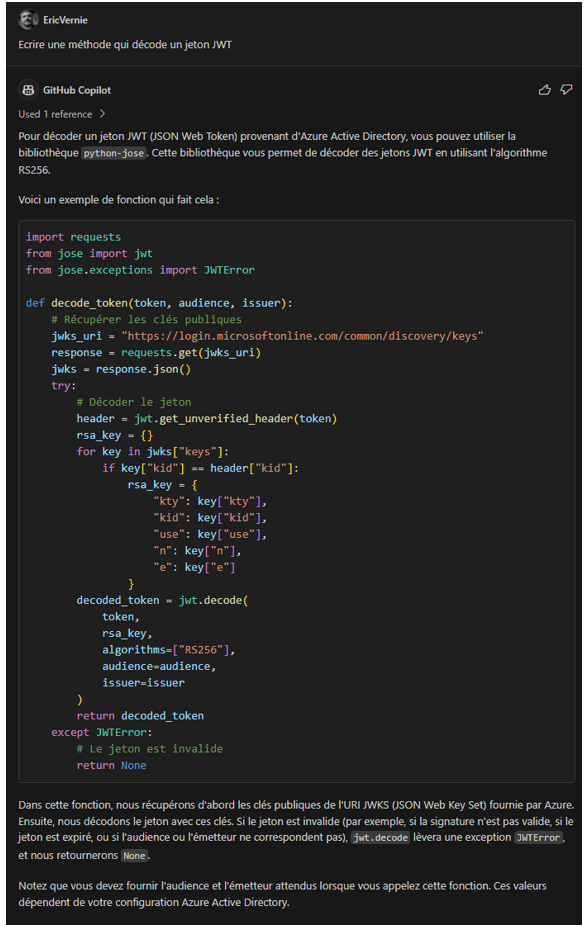
Based on my recommendations, at first glance, the answer seems relevant; there’s some fine-tuning to be done, but at least it works! And if it didn’t, I could simply ask GitHub Copilot to explain why with the /explain command or suggest a fix with the /fix command.
In any case, for this type of critical function, it’ll have to go through the GitHub Copilot mill again, with a question like:
Q: Is the Jose library for JWT validation reliable?

Add tests
Unit tests are part of a developer’s life. Testing is a repetitive task, and not everyone finds it rewarding. So… let’s ask GitHub Copilot for help.
In the file containing the code, let’s invoke GitHub Copilot with the command /tests and open the previously created test_main. py file we want the tests to end up in.
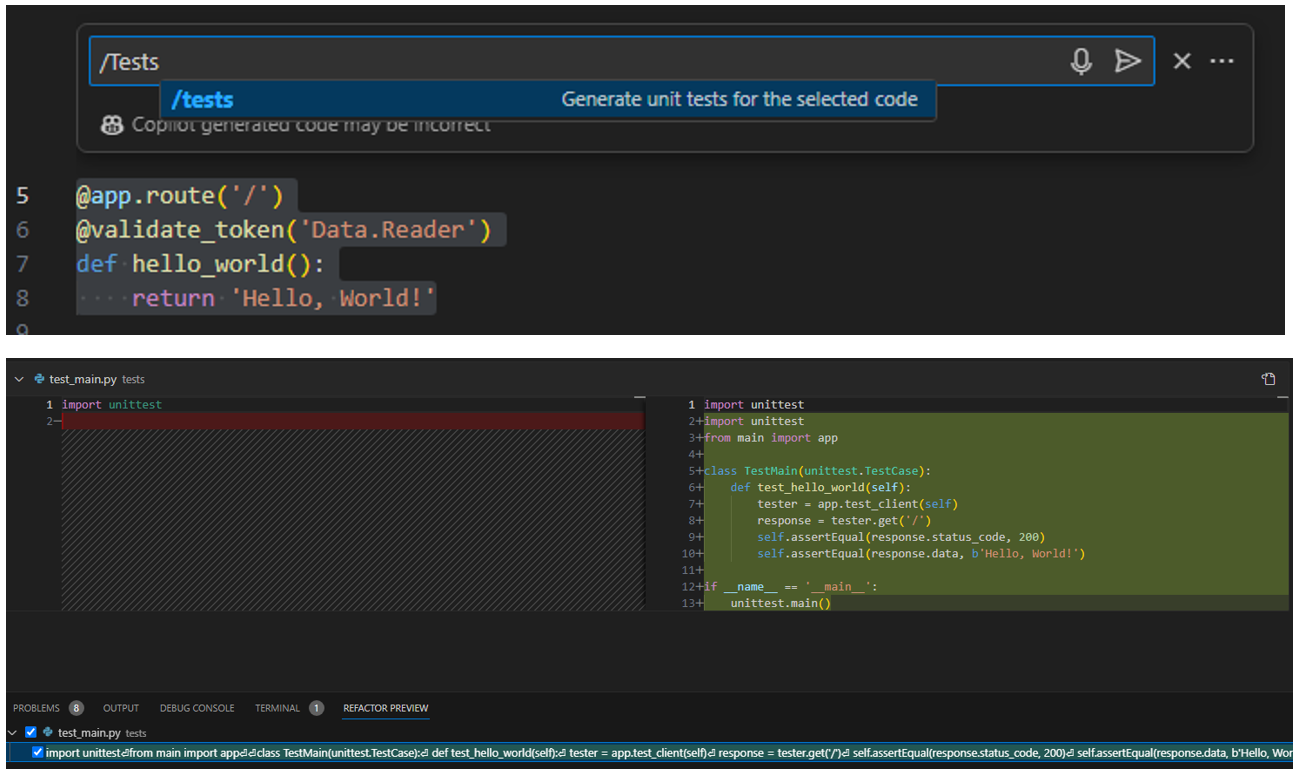
Like a merge, GitHub Copilot lets you insert the test (on the right in the image above) into the target file.
I only have one method here, but if there were several, GitHub Copilot would generate all the tests for all the methods.
Will the suggested test suffice?
That’s a no. The code will have to be refined a bit, but for someone expressly learning a new language and its environment, I think it’s an ideal programming partner.
Add documentation
Finally, I’d like to mention a task incumbent upon us all: documenting our code. A task we put off as often as we can, knowing that method signatures can change during the development phase.
With GitHub Copilot, just use the /doc command to add comments on the method(s) present in the code file.
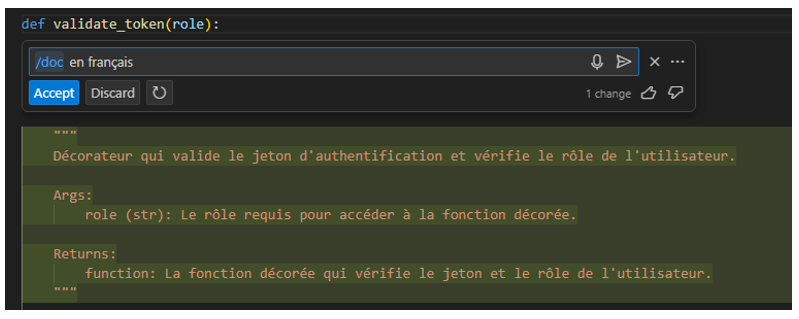
I was pretty skeptical about it, but like Bing’s Copilot (ChatGPT), you really have to try it out to understand the power of GitHub Copilot in this area.
In this case, I specified that I want the results in French, because by default answers are given in English. Of course, the default language can be specified in the settings.
You might be curious to know whether GitHub Copilot is more effective in the language of Shakespeare. Having written the same exercise in both languages, I didn’t notice any difference. One thing’s for sure, though: for the same request, GitHub Copilot might suggest two not entirely identical answers.
Last but not least, it’s possible to ask it to write documentation in markdown format, which is always a piece of cake.
Q: Can you write the documentation for the validate_token method #file decorator.py in the markdown file?
Don’t hesitate to reformulate the question if the suggestion is unsatisfactory.
Q: Could you include more details, for example, that it’s a decorator and add an example of using it?
Check out the result on this repo: EricVernie/GHCDecorator (github.com). Bear in mind that 100% of the documentation and 90% of the code were generated by GitHub Copilot.
Conclusion: What Do I Think of GitHub Copilot?
Did Copilot convince me? The answer is definitely yes. In just a few hours, I learned how to write, use, install, test, debug, and correct Python code, all in my favorite editor. I was even blown away when creating and writing the documentation.
Should we trust it blindly? Best not to: keep in mind that GitHub Copilot is based on billions of lines of code, not all of which are free of bugs. We’re responsible for the quality and security of our own code, and we’ll always need a trained eye to check the relevance of what GitHub Copilot suggests.
Also note that, in this exercise, I deliberately left out a few lines of code proposed by Copilot that seemed problematic to me in terms of security. If you’d like to take a look at them, I encourage you to check out this repo: EricVernie/GHCDecorator (github.com)
Using more conventional methods, would I have been as efficient, or at least as quick to grasp, a new development platform?
Today, I’m not so sure, because starting from scratch, in less than 24 hours, I had an environment and operational code that met my initial expectations.
One sure thing I’ve definitely seen is that GitHub Copilot will learn from you, and the quality of the prompts is paramount. Your development experience is an asset, as it will help GitHub Copilot understand your intentions.