

In this fifth and penultimate article in a series devoted to the benefits of having an integration platform within an...
21 March 2024
Lire cet article en Français
Integrating Terraform with OIDC and Workload Identity Federation in Azure DevOps

As Azure DevOps consultants, we’ve encountered a real challenge of managing the app registration’s secrets and certificates in the CI/CD pipelines due to their expiration date and the associated operational disruptions. Searching for a long lasting, more secure and simple authentication method led me to explore the use of OpenID Connect (OIDC) or federated credentials as an alternative.
However, integrating OIDC with Terraform presented a difficult issue, necessitating specific configurations. That’s why in this article, I will guide you through the setup of OIDC with Terraform in Azure DevOps pipelines.
How to Create a Federated Credential Service Connection?
Before getting into the OIDC pipeline description, we need to create a proper service connection. Following the establishment of federated credentials outlined in our previous article: Federated Credentials: How to Deploy an Azure Pipeline without Secrets or Certificates, I will dive deeper into the practical application of these principles within the Terraform technical stack.

But first, let’s understand authenticating steps of Azure DevOps pipeline tasks with Azure resources using OIDC and Azure Entra ID (previously Azure AD)
The Authentication Steps Explanation
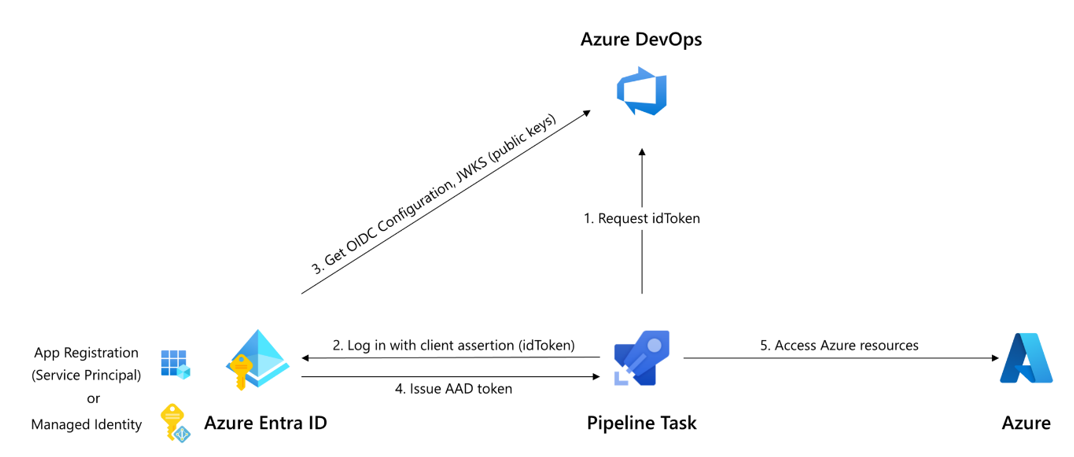
- Request idToken: The process begins where a request is made to obtain an identity token (idToken) which uniquely identifies the Azure DevOps pipeline and its permissions to Azure resources.
- Log in with client assertion (idToken): This step is critical because it substitutes traditional secret credentials with a token-based system (idToken), thus enhancing security.
- Get OIDC Configuration, JWKS (public keys): After authentication, Azure Entra ID retrieves the OIDC configuration along with the JSON Web Key Set, which contains the public keys used to verify the signature of the idToken. This ensures that the token is valid and issued by a trusted authority.
- Issue AAD token: Once the idToken is verified, Azure Entra ID issues an AAD token that the pipeline can use to interact with Azure resources.
- Access Azure resources: The pipeline task in Azure DevOps now has permission to access and deploy infrastructure as defined by the Terraform configuration files.
Terraform Pipeline Description with OIDC Configuration
Azure Pipelines has embraced Workload identity federation by strengthening the simplicity of tasks targeting Azure. We can notice it across a big range of built-in tasks, enhancing their ability to authenticate seamlessly with Azure’s resources for example:
AzureAppServiceManage, AzureAppServiceSettings, AzureCLI, AzureCloudPowerShellDeployment, AzureContainerApps, AzureFunctionAppContainer…etc.
Moving into the practical application of this feature, we’ll examine how to integrate OIDC within a Terraform pipeline, using the AzureCLI@2 task for inline script authentication.
Here’s the code that needs to be added as an authentication step:
The crucial commands that you need are:
- addSpnToEnvironment: true: By setting this, we invoke a secure and efficient method to populate the essential tokens and identifiers, enabling Terraform to authenticate directly with Azure.
- export ARM_OIDC_TOKEN=$idToken: This command sets the environment variable to the value of the idToken retrieved by the AzureCLI task. The idToken is a JSON Web Token provided by Azure Entra ID as part of the OIDC authentication flow. Terraform uses this token to authenticate with Azure services securely.
- export ARM_USE_OIDC=true: This command informs Terraform that OIDC authentication should be used. This flag triggers Terraform to authenticate using the token-based approach defined by the OIDC protocol.
Remember, the idToken has a short lifespan (it could be refreshed or customized for more than 10 minutes), which aligns with security best practices by reducing the risk of token leakage. This OIDC-based authentication method ensures that your Terraform pipeline is secure, manageable, and scalable.
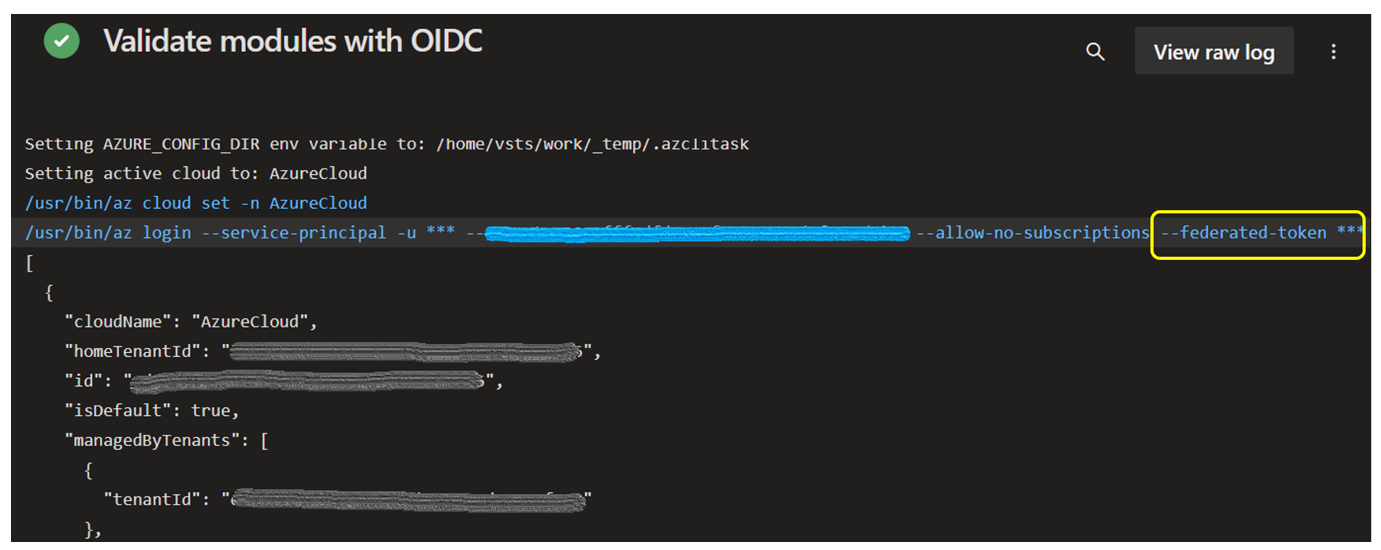
The expected results of you pipeline configuration should be as below:
Key Takeaways
Integrating OIDC with Azure Pipelines does more than just improve security; it also helps you avoid the hassle of keeping track of when service connections expire. This approach makes our work simpler and safer, letting us focus more on the code than the small little extra administrative things.
Would you like to learn more or get some expert help on your Azure Projects? Contact us!




I’ve been struggling to find a solution to this – thank you so much for sharing!!