In this fifth and penultimate article in a series devoted to the benefits of having an integration platform within an...
16 April 2024
Lire cet article en Français
Why Use Azure Integration Services?

Integration is the set of services and/or practices that connect the various applications of an Information System (IS). In other words, it is the process of transferring data between two or more systems to automate business processes.
However, integration is not simply a matter of transmitting data; we need to take into account a complex set of considerations:
- Securing data in transit is imperative to protect sensitive information.
- System reliability is crucial, because data loss can have a significant impact on business operations.
- Performance plays a particularly important role in e-commerce, for example, where the speed of transactions can make all the difference.
- Particular attention needs to be paid to FinOps issues, since we are using services that require computing resources, the cost of which can be significantly impacted by volume.
- Operational excellence, which encompasses aspects such as monitoring and time-to-market, is essential to ensure the continuous operation of systems and the rapid delivery of solutions to gain a competitive edge.
- Finally, system connectivity is a key element, covering a variety of environments (SaaS, On-Premise, private and hybrid Cloud, PaaS services, etc.) that need to be transparently integrated, while guaranteeing the security and performance of data exchanges.
So, a well-designed Azure integration platform is essential to meet these challenges.
Legacy EAI (Enterprise Application Integration) solutions such as Biztalk Server and IBM WebSphere, used for decades to meet enterprise integration needs, have historically been deployed in On-Premise environments. They are often associated with complex architecture and infrastructure, limited scalability and/or time-consuming implementation, high licensing costs, and monolithic structures that do not always meet the simple needs of some businesses or the scalability required to meet today’s challenge
In comparison, Azure Integration Services (AIS) is a modern, scalable approach to integration in the Azure Cloud. Unlike other integration vendors’ SaaS-based solutions, Microsoft’s AIS offers a Platform as a Service (PaaS) and a suite of separate, modular integration tools, providing greater control over the underlying infrastructure. It also enables smoother integration into the existing Azure ecosystem.
Reflecting on the design of an iPaaS platform in Azure goes beyond integration issues; it requires an understanding of the IS and the Azure ecosystem as a whole. For this reason, it is essential to rely on frameworks and tools such as Microsoft’s Cloud Adoption Framework (CAF) and Azure Well-Architected Framework (WAF) to guide architectural thinking. These tools provide a structured framework for efficient, optimized design of the integration platform in Azure.
What Tools Are Useful in the Design and Reflection Process?
Cloud Adoption Framework
The Cloud Adoption Framework (CAF) is a set of best practices and guidelines developed by Microsoft to help organizations adopt and successfully transition to the Cloud.
When it comes to designing a cloud integration platform, the CAF helps with understanding the key aspects to be considered, such as strategic planning, implementation options, and issues around governance, security, cost management, and regulatory compliance.
The CAF also promotes the concept of Landing Zones. These represent predefined, preconfigured cloud environments that serve as the basis for deploying workloads in Azure. Landing Zones provide a reference infrastructure that complies with best practices in security, compliance, and performance, enabling rapid start-up and reduced implementation times.
However, like any model, it is only a starting point for reflection. In this phase, we need to take a step back, be critical, and adapt this reference model to the solutions that will fully meet the company’s specific needs and requirements.
To learn more, check out the Microsoft documentation on implementing an AIS Landing Zone: “Azure Integration Services landing zone Accelerator.”
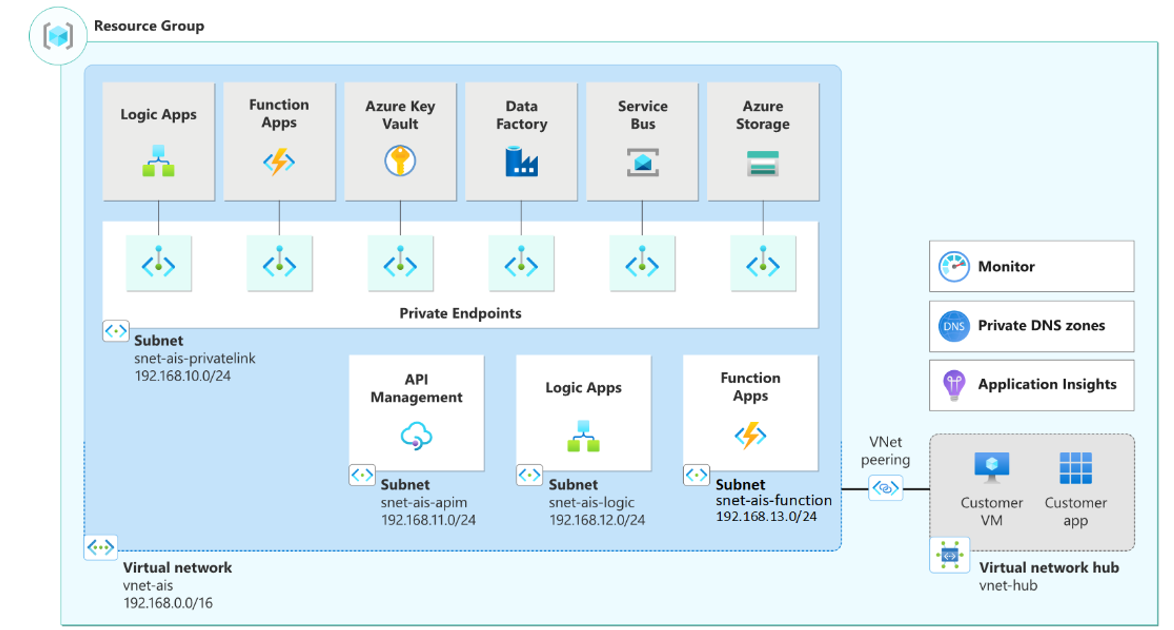
Azure Integration Services Landing Zone accelerator reference architecture (Source: Microsoft Documentation)
Well Architected Framework
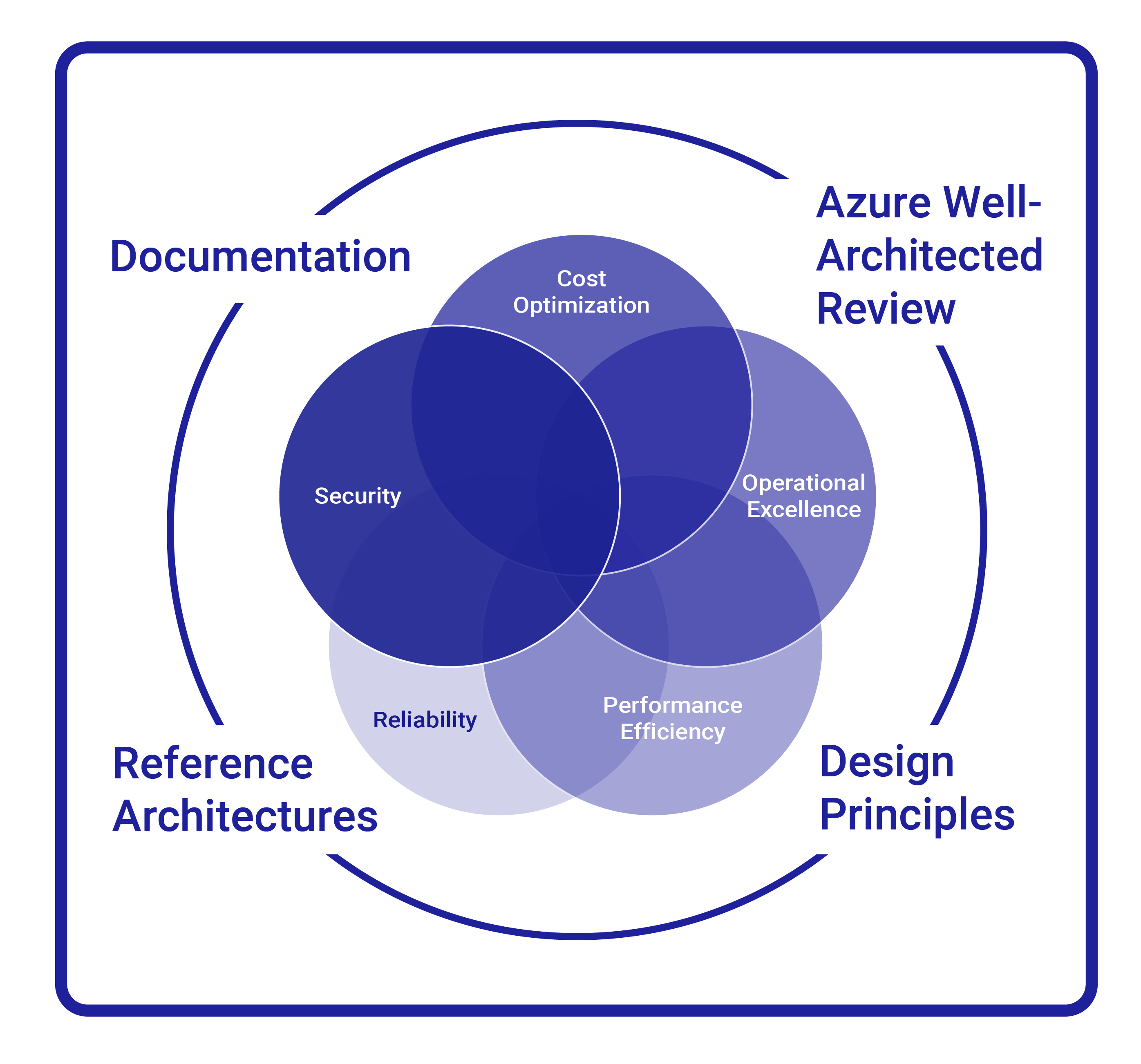
The 5 pillars of the Well Architected Framework
The Azure Well-Architected Framework (WAF) methodology was developed by Microsoft to help design, evaluate, and improve Cloud solutions in Azure. It is based on five fundamental pillars:
- reliability,
- security,
- cost optimization,
- performance efficiency,
- operational excellence.
When designing an integration platform, the WAF contributes to the reflection and Maintenance in Operational Condition (MOC) phases by providing a structured framework for evaluating and optimizing the design of the integration infrastructure in the Cloud.
As with any platform design, we need to reflect and plan from a global, company-wide standpoint. The integration architect may not necessarily have total expertise in all aspects of the Landing Zone, especially in terms of the network, security, identity management, and governance issues, among others. This makes it essential to maintain close collaboration with other key stakeholders, including:
- the enterprise architect, who ensures that the design is consistent with the company’s needs and strategy;
- the CISO (Chief Information Security Officer), who guarantees the platform’s compliance with corporate security standards;
- the Cloud Infrastructure Manager, who ensures that the Cloud best practices defined by the company are respected and can assist with platform implementation.
This collaboration must be guided by a clearly defined strategic vision. The integration architect must be able to understand and identify the specific requirements of the integration platform by asking the right questions based on the conceptual frameworks mentioned above.
Reflection & Planning: What Are My Platform’s Objectives? What Are the Most Important Questions to Ask?
We now turn to the crucial phase of reflection and planning, following the principles of the Cloud Adoption Framework. To help understand the fundamental objectives of our platform, we have put together a list of some of the key questions to consider for effective, strategic planning of a transition to the cloud.
Integration needs
- What are my organization’s current integration needs?
- By understanding the requirements, we can identify any gaps in integration processes, technologies used, and challenges encountered. For example, there are often significant differences between the integration needs of sectors like e-commerce and healthcare.
- Which integration patterns meet our needs best?
Do we need to expose APIs, set up ad hoc integrations, ingest and distribute events, do batch processing, have messaging systems, or ensure ordered deliveries? - Although there is no need to have the responses for all the patterns from the outset, it is important to have an idea of how they will be implemented in the future.
- How can we anticipate future integration needs, taking into account aspects like resource scalability and potential service expansion?
- One way is to anticipate future network requirements by reserving a sufficiently large range of IP addresses to align with projected needs.
Security
- What security strategy should we adopt to ensure the confidentiality, integrity, and availability of data passing through our integration platform?
- Should we implement specific mechanisms for authentication, encryption, access monitoring, and more?
- Do we want to expose our services externally and/or internally?
Performance and Resilience
- What are the performance and availability requirements?
- Will we have to cope with high volumes and load peaks? Do we need to implement resilient solutions to mitigate the consequences of a service interruption? If so, at what level?
Operations
- What error management mechanisms should we put in place to ensure that our integrations are reliable and robust? Do we need a central system for aggregating logs, whether technical or functional?
- What is the plan for monitoring and managing the performance of our integration platform? What tools and metrics will we use to monitor performance, detect bottlenecks, and optimize integration flows?
- How do we intend to manage updates and upgrades to our integration platform over time? What deployment and change management processes do we need to put in place to ensure the ongoing evolution and effective maintenance of our integration architecture?
- The key here is defining our options in terms of tools for infrastructure and application deployment, source management, etc.
- How do we plan to deal with scenarios where a system we integrate is temporarily unavailable or errors occur? What criteria need to be established to identify replay attempts and the error management strategies to apply in these critical situations?
- Setting up automatic or non-automatic data replay mechanisms is essential to guarantee the consistency of the systems we are integrating.
Costs
- What budgetary and resource constraints are associated with the design and implementation of our integration platform? How can we analyze the costs of our platform and optimize the use of resources to maximize efficiency and minimize costs?
- A provisional assessment of fixed and operational costs (log storage and resource utilization costs, etc.) is required.
Development
- How many different environments do we need to provision for our integration platform, considering the number of environments in the systems we are integrating?
- This is an important point, because we are integrating systems with more and less available environments compared to our integration platform. At the very least, we will have a Non-Production environment and a Production environment, with the aim of optimizing costs. We can, of course, plan for more environments (3 or upwards of 4) to align with the company’s IS standard in order to facilitate connectivity and testing phases.
Designing an Integration Platform in Azure: Approaches and Complexity
In the process of designing an integration platform in Azure, we have to consider the different approaches and levels of complexity according to the company’s specific needs.
There are two main approaches: starting from scratch without an existing Azure platform or integrating new elements into an existing Azure infrastructure to meet other needs.
Approach: Starting from scratch without an existing Azure platform
In cases where there is no established Azure platform yet, it is crucial to take into account the company’s specific requirements and build a solution that perfectly meets its needs. This approach may require the creation of a proof of concept (POC) to prove the solution, or it may be the starting point for a larger Landing Zone and, therefore, have a long-term strategy requiring in-depth analysis of business processes and data flows, in order to design an integrated and scalable platform.
Approach: Integration into an existing Azure infrastructure
If an Azure infrastructure is already in place, integrating new elements must be done consistently and without disrupting existing operations. This approach requires a thorough understanding of the existing Azure architecture, as well as careful planning to ensure smooth integration of new components.
Here is an example architecture following the Hub & Spoke network topology, where the integration platform is integrated into a Spoke network:
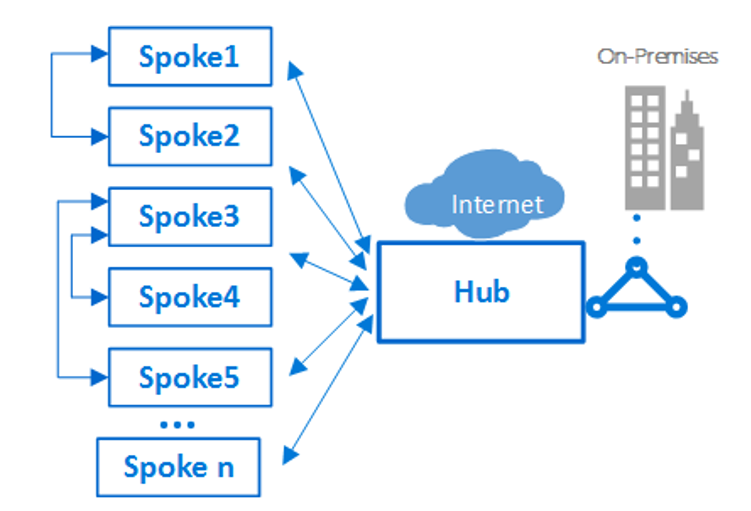
Example of Spoke networks connecting to each other and to a Hub (Source: Microsoft documentation)
In this example, imagine that the Spoke1 and Spoke3 networks are our integration platforms in the Development and Production environments and that they are each connected with other Spoke Networks to ensure connectivity with other services deployed in Azure.
IS complexity: Simple to moderate
For a small or medium-sized enterprise (SME), integration requirements can be fairly straightforward. It may not be necessary to have a dedicated integration team, but rather resources available to manage integration tasks as needed. It is important to follow the KISS (Keep It Simple, Stupid) principle and focus on simple, effective solutions. The advantage of modular AIS solutions is that they enable you to start easily, carry out proofs of concept, validate business use cases, and prepare for possible migration from an existing EAI.
The Cellenza MVP Integration product is ideal for companies looking for a simple and effective solution to embark on their Azure integration journey. It emphasizes the implementation of solutions tailored to business needs and proposes an agile approach to enable clients to quickly get underway, accelerate their time-to-market, and achieve low-cost success.
IS complexity: Complex
Companies with more complex integration needs, with numerous applications to integrate or scale up, require a more sophisticated approach.
A solid foundation must be laid for all integrations within the company, with a team dedicated to managing and optimizing this platform, which is often integrated into existing Landing Zones.
Cellenza’s Modern Integration service addresses this need, offering companies that have more complex integration requirements a comprehensive, scalable solution for analyzing, designing, implementing, and optimizing their large-scale integration processes.
How Do You Design a Platform That Meets Your Needs While Remaining Modular/Agile?
After establishing the general requirements, setting out a clear strategy, and defining the design framework, we can develop a conceptual architecture (or logical architecture), which will define our platform’s major Building Blocks.
The concept of Building Blocks is formalized and integrated into the TOGAF Framework and is defined as follows: A building block is a package of functionality, data, or specific technology defined to meet the business needs across an organization.
- They are used to see past an architecture’s complexity by breaking it down into smaller, manageable parts.
- Ideally, they can be reused, replaced, and upgraded to keep pace with technological developments and standards.
Imagine a Building Block as being like a piece of Lego or a brick used to build a whole.
Drawing on our various experiences, we can break the use cases for an integration platform down into four categories to meet our clients’ needs:
- Exposing APIs: a solution for easily creating, publishing, managing, and securing APIs in a centralized environment;
- Orchestrating simple or complex workflows with low or high volumes: solutions for automating business processes, from simple tasks to complex workflows;
- Having an enterprise message broker: a centralized asynchronous messaging solution, enabling reliable and secure transfer of messages between applications and services, while guaranteeing queuing, message delivery, and error handling.
- Delivering events: solution for real-time event and notification distribution
To use these services effectively and follow best practices, we also need to implement solutions for managing secrets and certificates, storage (of configuration data, logs), identities, and monitoring.
Each of these features is defined by a Building Block, which, naturally, is interoperable with others (e.g.: Front-end API management system for a Workflow Orchestration solution).
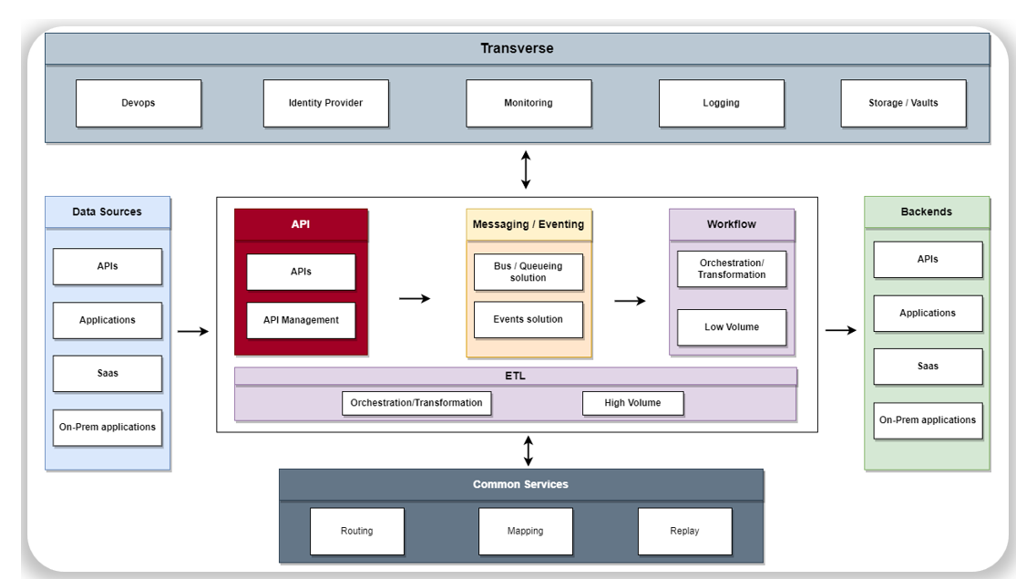
Example of Conceptual Architecture for an Integration Platform
So, let’s define our requirements for each of these services, still from a conceptual point of view.
To give a concrete example, we can define the following requirements for our workflow orchestration solution:
- Main use case – Deploy a workflow-based integration tool to orchestrate service processes and connect various services, with simple/moderately complex transformations.
- Reliability – 99.9% expected availability. It must be possible to restore the solution in accordance with the RTO (Recovery Time Objective) defined by the company (< 4h).
- Performance – The solution must be horizontally and vertically scalable to handle low to medium volumes (< 10k runs/day).
- Security – The service must be able to be run in a completely isolated environment. We need to be able to secure all incoming and outgoing traffic, as well as route outgoing traffic to a specific endpoint.
- Service endpoints must not be exposed live on the Internet. Data must be encrypted at rest.
- TLS must be enabled for both incoming and outgoing traffic.
- Cost reduction (TCO) – Option to reserve instances if fixed costs are associated with the solution. Option to reduce the number of instances to a minimum if the service is not in use.
- Operations – Native integration of the solution with standard Azure monitoring tools.
- Fast TTM (Time To Market) – Native integration with the main Azure services and integration with Azure DevOps for deployment via CI/CD (Continuous Integration/Continuous Deployment).
Designing an Integration Platform in Azure: Key Takeaways
To wrap up, here is a summary of what we feel are the most important points:
- Designing an integration platform in Azure is a big step towards a Cloud-First approach, offering agility, scalability, and resilience to companies seeking to embrace modernization and anticipate the obsolescence of certain legacy systems.
- Prior reflection with a clearly defined strategy is essential for successfully designing an integration platform in Azure.
- Using tools such as the Cloud Adoption Framework (CAF) and the Azure Well-Architected Framework (WAF) ensures a structured methodology and optimal design of Cloud solutions in Azure.
- Successfully designing an integration platform in Azure also depends on close collaboration between technical teams, enterprise architects, and key stakeholders, as well as alignment with the company’s strategic objectives.
- Keeping the design modular makes it possible to agilely adapt the platform to technological and business developments, maximize component reuse, and minimize the risks associated with change.
In the next post in this series, one of our experts will give a detailed explanation of the various services provided by the Azure Integration Services suite.
Interested in learning more about developing a modern integration platform? Read the other posts in this series:
- Why Develop a Modern Integration Platform?
-
How Can You Use AIS to Adapt Your Integration Platform to Azure Services?