Introduction Integrating security into a widely used platform like GitHub is both a challenge and an opportunity to enhance its...
16 May 2024
Lire cet article en Français
Microsoft Security Copilot: A Revolution for SOC Teams

Since April 1, 2024, we are now able to take advantage of Copilot for Security (GA) to help us handle alerts/incidents and, more broadly, to ensure the security of our IT environments.
Copilot for Security will enable SOC (Security Operation Center) teams to react more quickly to an alert or incident by understanding the situation in natural language and ways of remedying it with a guided response.
This post will give you an overview of the situation and explain the undeniable contribution of Copilot for Security.
Update on Microsoft Security Copilot
Every SOC team has experienced the difficult task of sorting through the vast amount of information coming in, sometimes from several different admin consoles.
Aware of this situation, Microsoft has successively integrated its security products.
With Microsoft Defender XDR (formerly Microsoft Defender 365), Microsoft has made it possible to track alerts and incidents relating to defender products in a single console accessible on https://security.microsoft.com. As a reminder, an XDR (eXtended Defense Response) automatically collects and correlates data from several security layers: email, endpoint, identities, SAAS applications and the cloud.
In addition, Cloud alerts and correlations from Microsoft Defender for Cloud (CSPM – Cloud Security Posture Management, which increases the level of security by applying the suggested recommendations / CWP – Cloud Workload Protection, which detects threats on Cloud environments and blocks/triggers alerts and incidents to be handled by SOC teams) are now triggered directly in Microsoft Defender XDR. SOC teams can therefore access all Microsoft security information from a single interface.
Finally, via a bidirectional connector, we can send XDR alerts and incidents to the Microsoft Sentinel SIEM and SOAR platform.
The diagram below illustrates this:

Source: Microsoft documentation
Embedded Experience and Microsoft Defender XDR / Microsoft Sentinel
Copilot for Security can be used as a standalone and/or embedded experience:
- When Copilot for Security is accessed via a product like Microsoft Defender XDR, it is considered an embedded experience.
- When Copilot for Security is accessed via https://securitycopilot.microsoft.com, it is a standalone experience. Copilot for Security can also be managed from this standalone experience.
Copilot for Security’s embedded experience is first and foremost the incorporation of generative AI into the processing of security alerts and incidents, with Microsoft Defender XDR / Microsoft Sentinel, for example.
Natural language translation of an alert or incident makes it possible to respond to threats by assessing risk exposure more quickly.
To achieve this, Copilot for Security provides access to the latest LLMs (Large Language Models), drawing on the close relationship established between Microsoft and OpenAI to combine advanced GPT4 models with the global security vision provided by Microsoft via the 65,000 billion daily signals analyzed.
In concrete terms, what Copilot for Security provides for Microsoft XDR and Microsoft Sentinel is:
- a concise, actionable incident summary,
- an impact analysis to assess the potential impact of incidents using insights and to prioritize responses,
- backwards engineering of scripts with natural language explanations,
- a guided response with actionable instructions on triage, investigation, containment and remediation through recommended actions.
As shown in the image below (in the incident summary), a security analyst will have access to a natural language explanation. Other Copilot windows will support impact analysis, reverse engineering, and so on.
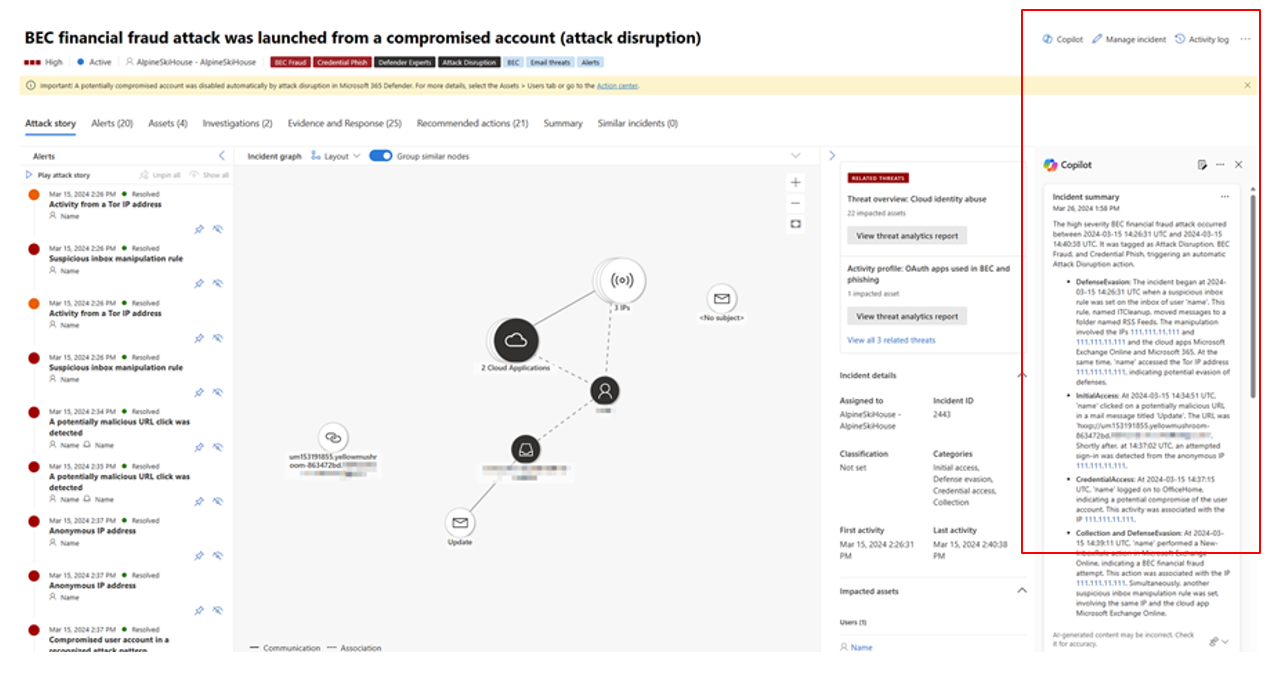
Microsoft Copilot for Security ecosystem
Microsoft Copilot for Security is not limited to Microsoft products, or even just Microsoft Defender XDR or Microsoft Sentinel.
More broadly, Copilot will enhance the Microsoft 365 environment, Microsoft Entra-ID, Microsoft Purview, Microsoft Intune, Defender EASM, and Defender Threat Intelligence.
And although there is no Copilot marketplace (yet), Microsoft’s security partners can publish Copilot Security plugins.
Microsoft Copilot for Security deployment and pricing
Copilot for Security is sold in a provisioned capacity model and is billed by the hour, with a one-hour minimum.
Copilot for Security pricing is based on Security Compute Units (SCUs).
Within an Azure subscription, these SCUs define the resources Copilot for Security needs to run. You can increase or decrease them at any time in the Azure portal or the Copilot security portal (https://securitycopilot.microsoft.com).
However, Microsoft recommends using the Copilot portal for creating SCUs.

You must be an Azure Owner or Contributor at least at resource group level to be able to create capacity.
The cost of an SCU is $4 per hour (pricing available via Microsoft’s pricing calculator).
“Chat” with Copilot for Security
Copilot for Security can be queried via the prompt.

All you have to do is put your question to our generative AI.
There are also featured prompts. These are a set of predefined prompts designed to help you perform common security-related tasks with Copilot for Security.
For example:
- Analyze a script or command: this prompt identifies the script language, the purpose of the script, potential risks, and recommended actions.
- Generate a security query: this prompt converts your natural language query into a query language, such as KQL or the Microsoft Graph API.
- Generate a security report: this prompt helps you generate a security report for a specific audience, such as executives, managers, or analysts.
Finally, similar to the playbooks used to call a Logic App and automate incident response, Copilot for Security provides promptbooks.
These ready-to-use workflows can be used as templates to automate investigations and/or incident responses.
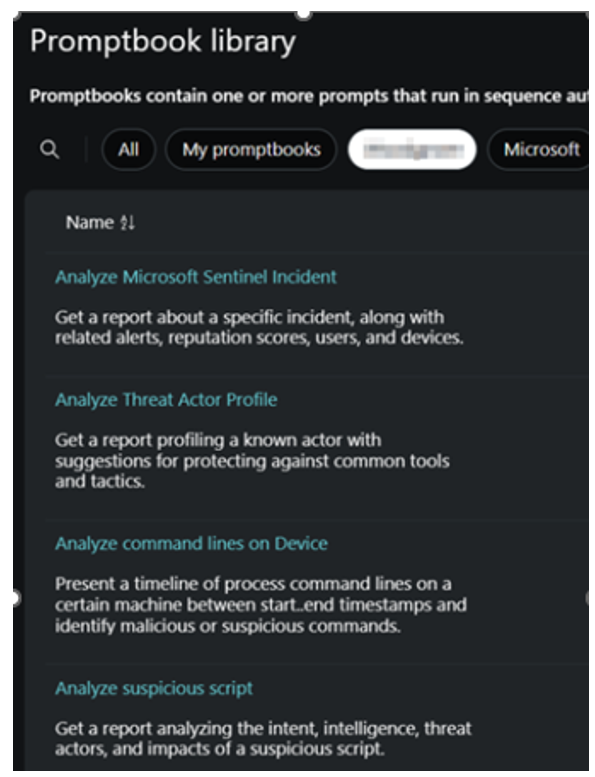
Each prebuilt promptbook requires a specific input, like a code snippet, a threat actor name, or a Microsoft XDR or Microsoft Sentinel alert identifier.
You can also write your own promptbook.
Microsoft Security Copilot: Key Takeaways
Thanks to its integration with Microsoft security products, its plug-ins, its prompts as well as the queries and analyses that can be performed, Copilot for Security is a real game changer for SOC teams.
Also: a new post on “Microsoft Unified Security Operation Platform Now on Public Preview”
Looking for help with cloud security? Contact us!