Introduction Integrating security into a widely used platform like GitHub is both a challenge and an opportunity to enhance its...
20 March 2025
Lire cet article en Français
Improving cybersecurity with DevSecOps: key strategies and tools

Introduction
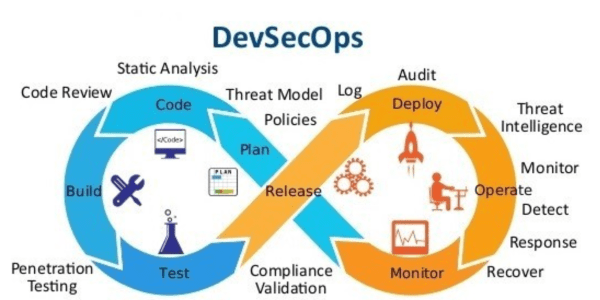
In today’s rapidly evolving technological landscape, organizations face an ever-growing array of cyber threats. Sophisticated attacks targeting software vulnerabilities can lead to data breaches, financial losses, and reputational damage. As a response, traditional DevOps practices must evolve to prioritize security without compromising on speed and agility. This is where DevSecOps steps in—a methodology that integrates security at every stage of the software development lifecycle. This article outlines actionable strategies for implementing DevSecOps to ensure your DevOps pipeline is both agile and secure.
This article will give you an introduction to the concept of DevSecOps and a practical case study for a DOTNET Application deployed on an Azure Web application.
What isDevSecOps ?
DevSecOps is an evolution of the traditional DevOps approach, embedding security into every phase of the development and deployment process. By treating security as a shared responsibility, DevSecOps bridges the gap between development, operations, and security teams. Its goal is to ensure that applications are not only delivered quickly but are also inherently secure, meeting the demands of modern businesses and regulatory requirements.
The Core Principles of DevSecOps
The core principles of DevSecOps revolve around embedding security into the pipeline at every stage. These principles are:
- Security as Code: Security is automated and integrated into the CI/CD pipeline as code, ensuring that security controls are consistently applied.
- Shift Left: Security considerations are introduced early in the development process, reducing vulnerabilities before code is deployed to production.
- Automation: Security checks are automated to minimize human errors and speed up the process.
- Collaboration: Development, security, and operations teams work together seamlessly to ensure security is a shared responsibility.
- Continuous Feedback: Real-time feedback is provided on security issues, allowing teams to address them quickly.
- DevSecOps Integration: Where to Start
Integrating DevSecOps into your pipeline can seem daunting, but starting small ensures success:
- Conduct a security assessment to identify gaps in your current DevOps processes.
- Build a security-first culture by training teams and gaining leadership buy-in.
- Introduce basic security tools, such as static application security testing (SAST), into development workflows.
- Use pilot projects to refine processes and tools before scaling DevSecOps practices organization-wide.
To make this journey practical and actionable, we’ll keep this article light on theory and focus on the technical aspects of implementing DevSecOps effectively with a case study of a DOTNET Web application on azure.
Securing the Development Lifecycle
Securing the development lifecycle involves integrating security measures into each stage of the process:
- Code: Implement static code analysis (SAST) to identify vulnerabilities early in the development phase.
- Build: Ensure build processes are secure by integrating security tools that scan dependencies and container images.
- Test: Automate security tests, such as dynamic analysis (DAST) and interactive application security testing (IAST), to catch vulnerabilities that may not be apparent in static code.
- Release: Automate security checks in the release process to prevent the deployment of insecure code.
Enhancing CI/CD with Security
Integrating security into your CI/CD pipeline ensures that vulnerabilities are identified and addressed before code is deployed to production. To enhance security further and improve standardization, it’s crucial to centralize key components such as IaC modules, build and deployment pipeline templates, and configuration management. This approach not only strengthens security but also streamlines the development process and ensures consistency across environments.
Here are the key strategies:
- Static and Dynamic Scanning: Utilize tools like Prisma Cloud to perform both static and dynamic image scanning. The static scan detects known vulnerabilities in container images, while the dynamic scan monitors for suspicious behavior during runtime.
- Centralized IaC Repository: A centralized repository for Infrastructure as Code (IaC) modules helps standardize and secure infrastructure provisioning. By storing reusable Terraform, Ansible, or CloudFormation modules in a central location, teams can ensure consistent configurations across all environments. This minimizes configuration drift and reduces the risk of misconfigurations that could expose your infrastructure to security vulnerabilities.
- Build and Deployment Pipeline Templates: Create reusable build and deployment pipeline templates to standardize the CI/CD process. These templates can be stored in a centralized location, ensuring that every team follows the same steps for building, testing, and deploying applications. Standardized pipelines help integrate security checks seamlessly into the workflow, preventing deviations that could introduce risks.
- Centralized Configuration Management: Centralizing configuration management allows teams to enforce security policies across all environments. For instance, sensitive configurations such as API keys, database credentials, and encryption keys can be stored securely in centralized configuration tools (e.g., HashiCorp Vault, AWS Secrets Manager). By automating the process of retrieving and injecting these configurations into the deployment pipeline, you ensure that sensitive data is handled securely without manual intervention.
- Self-hosted CI/CD Agents: Use self-hosted CI/CD agents to maintain control over the environment and reduce the risk of compromised third-party agents. This practice allows for tighter security measures and custom configurations that meet your organization’s specific security requirements.
- Automated Security Gates: Set up security gates in your pipeline to halt deployments if vulnerabilities exceed predefined thresholds. These gates can include automated checks for code quality, security misconfigurations, and potential vulnerabilities in dependencies
Infrastructure as Code (IaC) Security
Infrastructure as Code (IaC) automates infrastructure provisioning and management, making it essential to implement security practices in IaC configurations:
- IaC Scanning: Use tools like Checkov or TFLint to scan Terraform files for misconfigurations that may expose the infrastructure to security risks.
- Terraform Testing: Implement testing frameworks that simulate and verify the security of infrastructure before it’s deployed.
- Policy as Code: Define security policies in code and integrate them into the IaC workflow to enforce security controls automatically.
Library Configuration: Setting Up Variables
The pipeline uses predefined Azure DevOps variables to ensure security and reusability. AppServiceName specifies the Azure Web App for deployment, RegistryName identifies the ACR instance, SonarQubeKey enables static security analysis, PrismaCloudToken is used for container vulnerability scanning, and KeyVaultName references Azure Key Vault for managing sensitive credentials.

CI/CD Pipeline Overview: Automating Security & Deployment
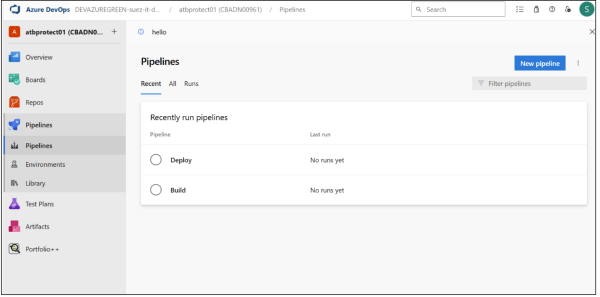
This DevSecOps workflow consists of two main pipelines in Azure DevOps. The Build Pipeline automates security scanning, application build, and container image creation, while the Deploy Pipeline ensures secure deployment to Azure Container App with integrated security checks. These pipelines embed security at every stage to minimize risks before deployment.
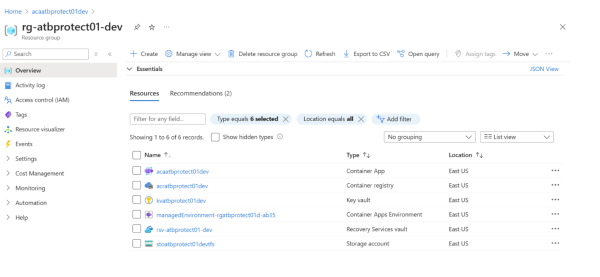
Executing the Build Pipeline & Storing the Image in ACR
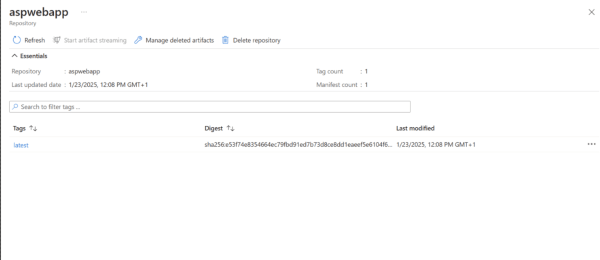
The build pipeline starts with code analysis and security scanning using SonarQube for static analysis and Prisma Cloud for dependency scanning. The .NET application is then containerized using Docker, and the validated container image is pushed to Azure Container Registry (ACR) for secure storage.

And here you can see the stored image
Executing the Deploy Pipeline
The deploy pipeline deploys the container image from ACR to Azure Container Service, and here is the final result:

This tutorial demonstrates how integrating security into CI/CD pipelines ensures a secure and automated deployment process for .NET applications on Azure. By embedding DevSecOps best practices, teams can enhance security without compromising agility.
Future Trends in DevSecOps
As DevSecOps continues to evolve, several key trends are shaping its future:
- AI and Machine Learning in Security: AI-driven security tools will help automate vulnerability detection and response, improving both speed and accuracy.
- Shift-Left Evolution: Security will be integrated even earlier in the development lifecycle, with real-time vulnerability scanning and remediation becoming commonplace during coding.
Cloud-Native Security: As organizations move to the cloud, the focus will shift toward securing cloud-native applications, leveraging tools and platforms designed to protect dynamic cloud environments.
Conclusion
Integrating security into your DevOps pipeline through DevSecOps is no longer a luxury but a necessity. By adopting a security-first approach and embedding security throughout the software lifecycle, you can reduce risks while maintaining the speed and agility that modern development demands. Whether you are just starting with DevSecOps or looking to enhance your existing practices, following these strategies will help you build a robust and secure pipeline that meets both security requirements and business needs.