Introduction Integrating security into a widely used platform like GitHub is both a challenge and an opportunity to enhance its...
13 February 2024
Lire cet article en Français
Data Loss Prevention and Insider Risk Management: What Are the Differences and Why Combine Them?
Our previous articles on how to deploy DLP policies and how to structure DLP strategy governance helped you understand how to implement data “in motion” protection with Data Loss Prevention (DLP).
Although DLP policies are highly effective, they may not be sufficient to identify certain situations that put the organization at risk in terms of data leaks (or theft).
The terms “data loss” and “data leak” may seem to mean the same thing, but data leaks and/or theft are often the result of more covert actions, such as industrial espionage.
Microsoft Purview offers a solution called “Insider Risk Management” (IRM), which works either independently or in conjunction with the “Data Loss Prevention” solution.
These two solutions operate in very different ways, but their mechanisms can actually complement each other perfectly. And that’s what this post is all about.
Microsoft Purview: what are the prerequisites?
The information shared in this post on Data Loss Prevention can be used with an Office 365 E3 license and up.
Use of Microsoft Purview’s Insider Risk Management solution requires at least M365 E3 licenses + the Insider Risk Management bundle.
For more information on Microsoft Purview licensing, take a look at the Microsoft documentation on Purview pricing.
The 5 differences between DLP and IRM
Below is a general comparison chart to help you understand the differences between DLP and IRM.
| Features | Data Loss Prevention (DLP) | Insider Risk Management (IRM) |
| End-user use cases | “I need to share this data with my contacts (ASAP)” | “This data is too valuable, I need to make a copy” |
| Activity monitored | Single user action, possibly repeated | Sequence of user actions exceeding a risk threshold |
| User interaction | None / Information banner on screen / Pop-up / blocking / workflow / etc. | None |
| Policy trigger | E-mail or Teams conversations, document sharing, copying, moving, etc. | DLP alert, third-party application connector, or predefined sequence of user actions |
| Technical scope | M365, workstation, other SaaS Apps | M365 and connectors |
The basics of how DLP works
As mentioned in the introduction, a DLP policy aims to prevent users from sharing certain data, either intentionally or (very generally) inadvertently, according to the evaluation of one or more predefined rules, where each rule targets a very specific user action. For example:
- Sending personal data by e-mail to a recipient outside the organization;
- Sharing from SharePoint Online or OneDrive, to “Guest” or even internal users, a document with a confidentiality label of “Confidential” or higher;
- Sharing confidential or sensitive data in a Teams chat with a colleague or a user of another M365 tenant.
The triggering of each of these rules will have the effect of generating a user interaction (see previous table) and, ultimately, depending on the severity of the event, generate a DLP alert which will be monitored by a security operations center (SOC) or other type of team.
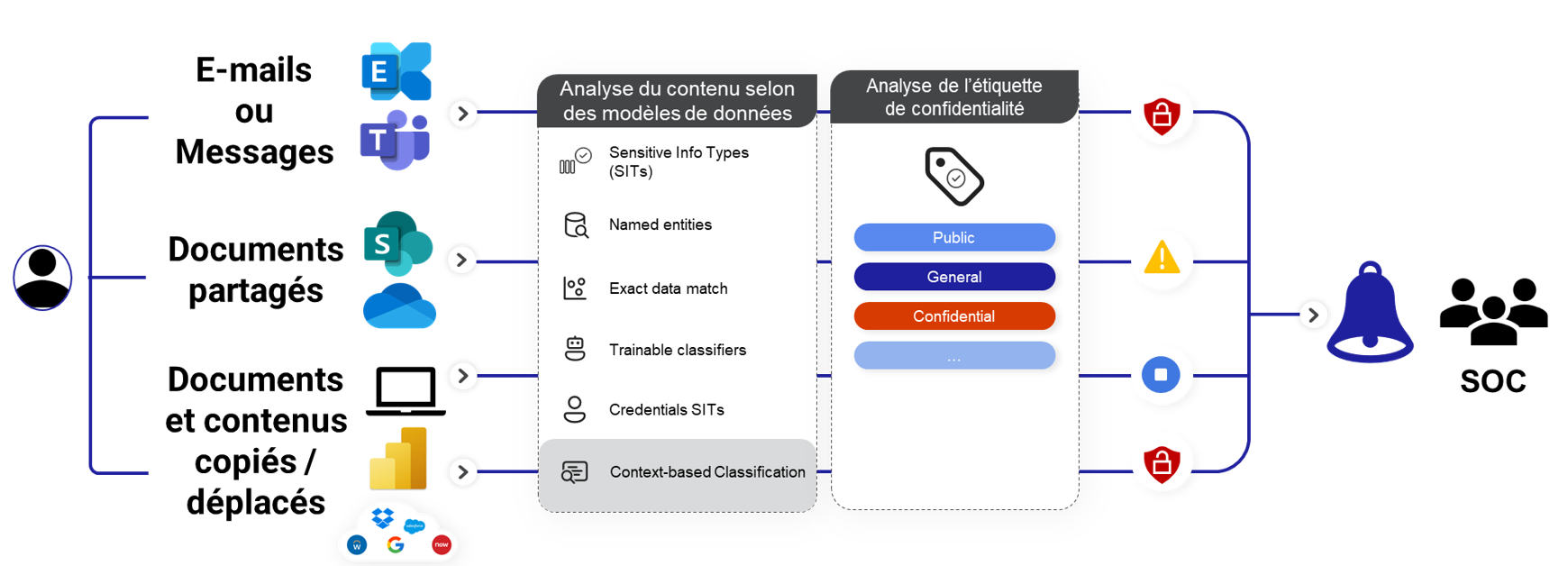
Data Loss Prevention kinematics
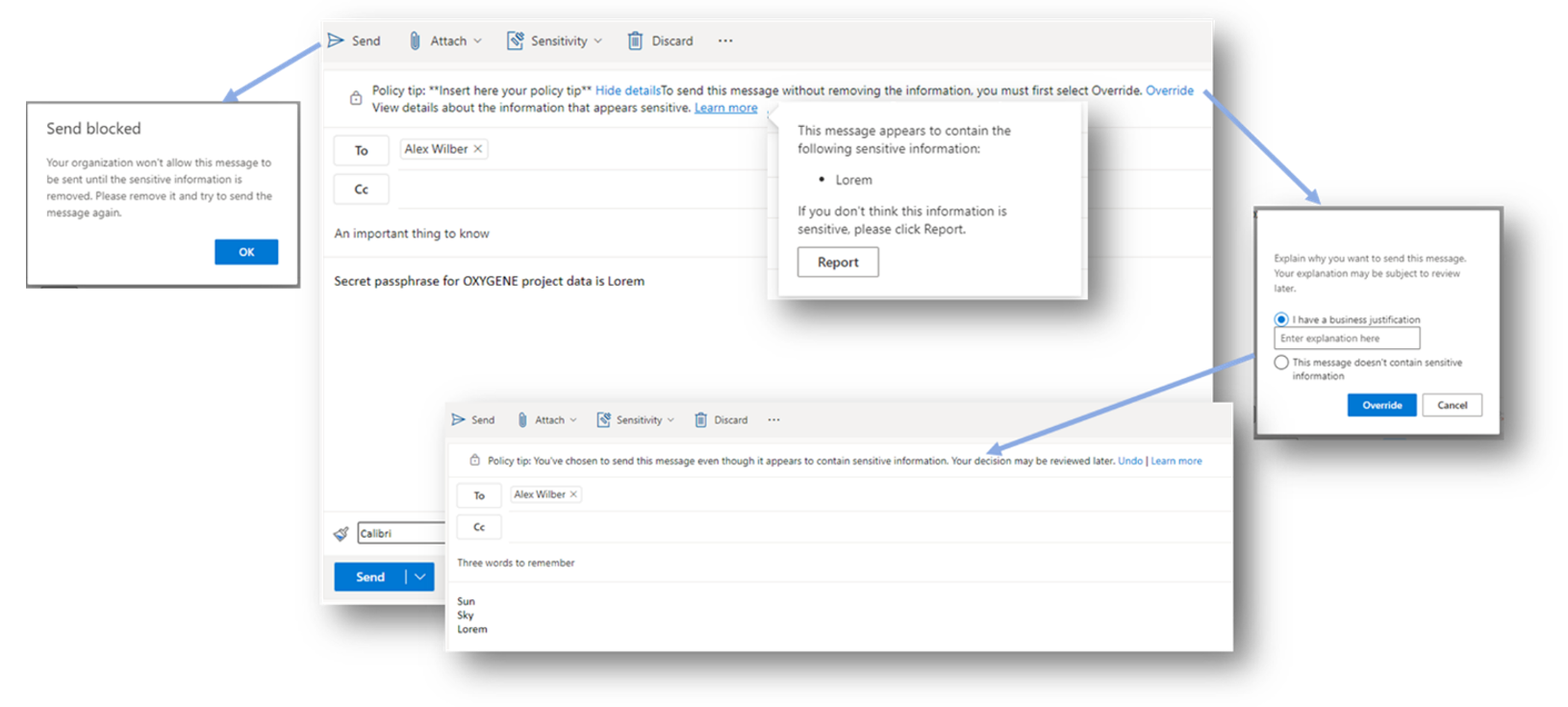
A look at the user experience triggered by DLP when an e-mail is blocked

Panel listing DLP alerts triggered by the organization’s users.
The basics of how Insider Risk Management works
An IRM policy, on the other hand, will focus on identifying and analyzing the actions a user may have performed on company data over a long period (up to 120 days), broken down as follows:
- Up to 90 days before the occurrence of an event that triggered the IRM policy
- Up to 30 days after the occurrence of the same event
Over this period—and depending on the settings that have been configured—the IRM policy will identify and list all actions (known as “signals”) deemed to present a risk for the company. Below are just a few examples:
- Downloading many documents stored on M365
- Changing the confidentiality label on documents to remove protective measures
- Copying documents to a USB memory stick
- Bulk deleting documents
- Renaming many documents
What’s considered risky behavior won’t be the triggering of any one of these signals, but instead each of them being carried out in a certain sequence, which is considered risky for the company with regard to the data manipulated.
The illustration below summarizes a use case that could be found in any organization handling large amounts of data with commercial and/or intellectual property value.
Let’s take a situation where an employee’s contract end date (internal or external) is recorded by a manager or the HR department in the organization’s human resources information system (HRIS). This recording acts as a trigger within Microsoft Purview for the activation of an IRM policy aimed at this employee. This policy then starts analyzing the user’s logs over a past period of 1 to 120 days and, depending on the signals selected within the strategy, lists and “accumulates” these signals.
Similarly, until 30 days after this trigger, or at least until the user account is deactivated ahead of this 30-day deadline, the actions of users associated with these signals are taken into account for the risk analysis.
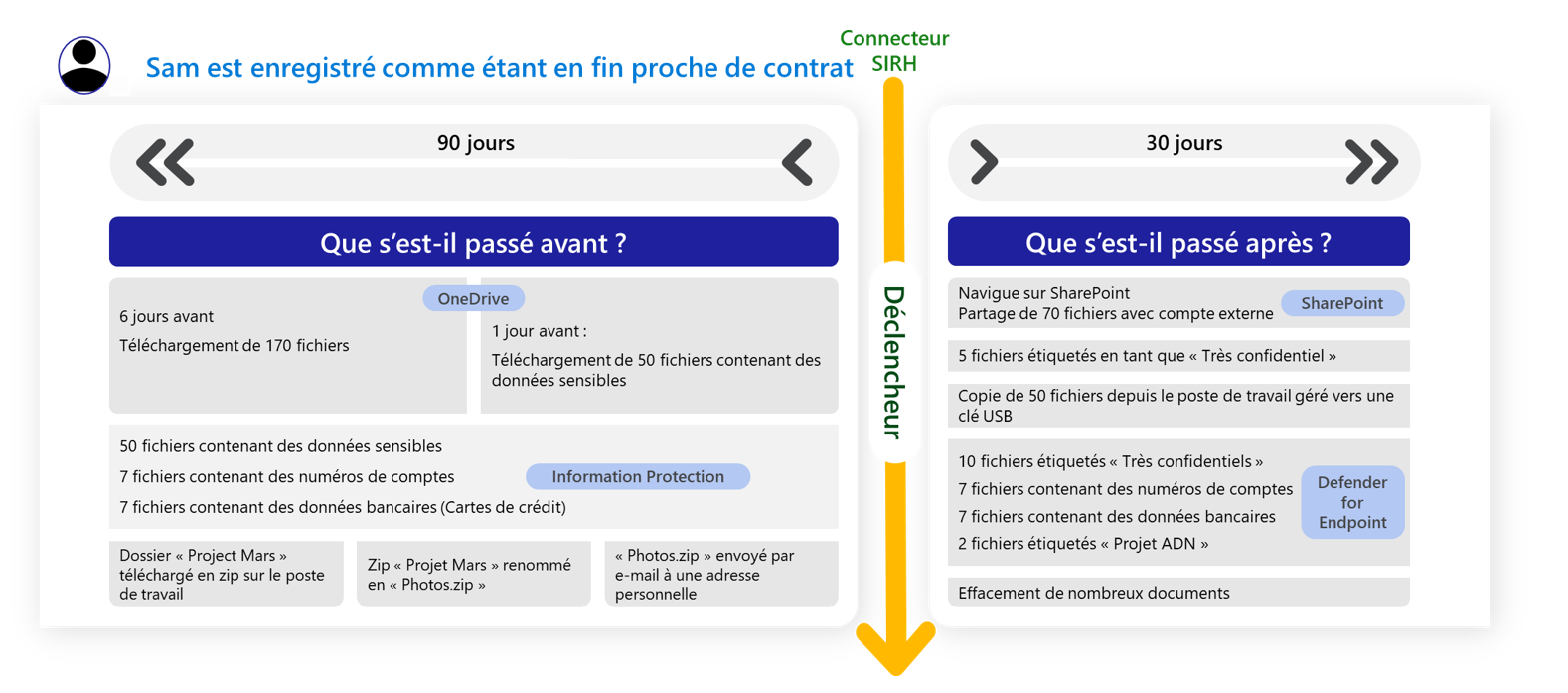
Insider Risk Management policy kinematics
As soon as a sufficient number of these signals have accumulated, an alert is created in the portal, indicating that the user’s behavior needs to be monitored, with a risk score of “low,” “medium” or “high”.
Just like a DLP alert, an initial investigative analysis by a tier 1 security team can start within the Microsoft Purview portal and lead either to qualifying the alert as a “case” to investigate or to declaring it as a benign situation or even a false positive.
Why and how to combine DLP and IRM
As explained above, the IRM policy(ies) configured with Microsoft Purview can be used to identify users performing sequences of actions deemed to pose a risk to the confidentiality of corporate data.
Depending on the actions and their volume or frequency, each of these users is assigned a “risk score” according to three levels: Low, Medium, High.
Microsoft Purview can then use this risk score as a new condition for triggering a DLP rule and, depending on this score, the protective control adapts to better counter a data leak risk. This is known as adaptive protection.
Over time, a user’s risk score may go up or down, and the DLP rules will automatically adapt to this user.
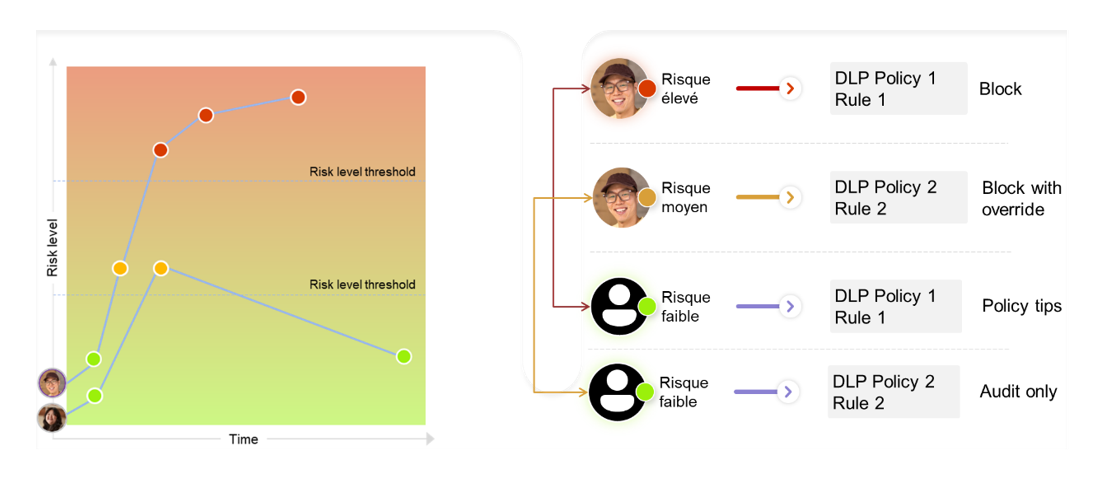
Effects of user “risk score” on DLP rule behavior (source: Microsoft)
Taking a “risk score” into account as a condition within one or more DLP rules is a piece of cake:
- Activate and configure the “Adaptive Protection” feature of the Insider Risk Management solution
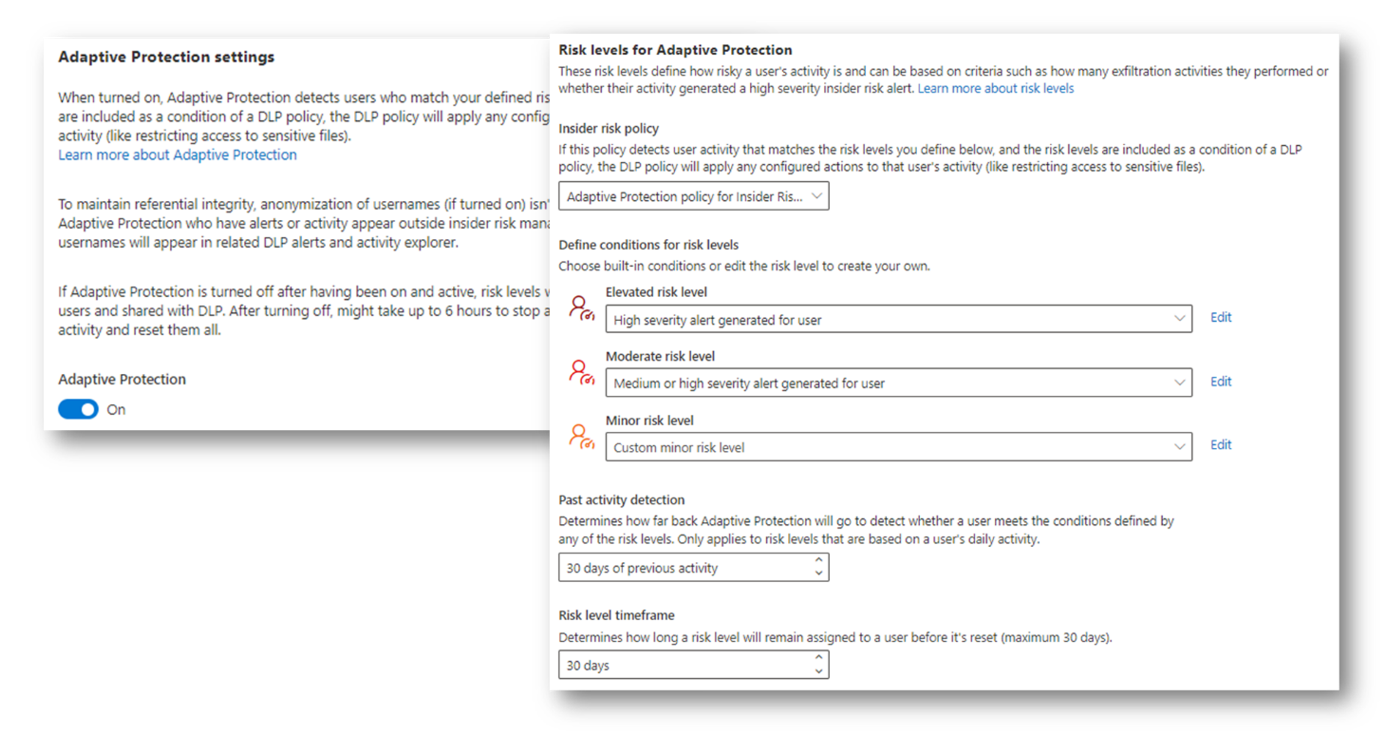
Activate and configure “Adaptive Protection” with Insider Risk Management
- Within a DLP rule, select the condition “User’s risk level for Adaptive Protection is”
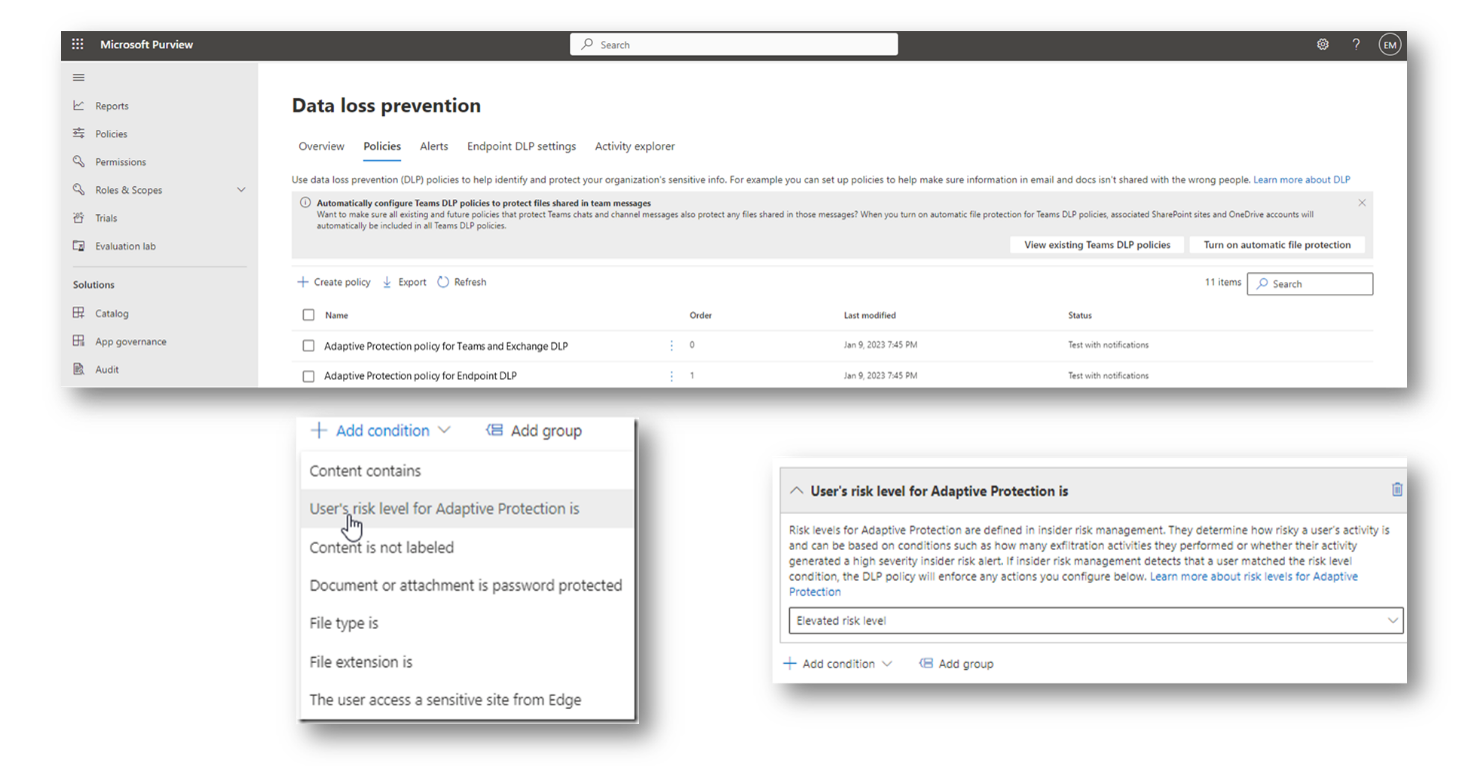
Configuration of a DLP rule using adaptive protection as a trigger condition
DLP and IRM: key takeaways
Microsoft Purview is a platform that has grown from strength to strength over the years, offering an ever more comprehensive and effective range of data protection solutions.
Every solution, whether it’s Information Protection, Data Lifecycle Management, Data Loss Prevention, or Insider Risk Management (among ) can be used as a stand-alone solution, allowing each organization to define its own deployment plan, from the simplest to the most ambitious.
Industrialization and automation of data protection measures still remain the key to any organization aiming to increase its maturity and efficiency.
Combining DLP and IRM within Microsoft Purview is a great example of this automation:
- When used independently, DLP offers an approach to protection in which the audiences (targeted users) are defined in a “perimeter-based” manner, using either static or dynamic groups to define these audiences. Each individual in this audience, for a given DLP rule, is assigned the same control and protection rules over the data handled as other users.
- As for IRM, it can be used to identify users within a population who are likely to pose a greater risk to the organization’s sensitive and/or valuable data, due to actions of theirs that are considered suspicious and that may extend over a long period.
- Without IRM, the organization would be unable to:
- Quickly identify at-risk (often “hidden”) situations for certain users;
- Quickly adapt DLP rules for these users to apply more restrictive rules.
Of course, for an IRM policy to be effective and not generate false alerts, the actions to be identified, their thresholds, and the sequences of these actions must be calibrated appropriately. In a future post, we’ll take a closer look at configuring an IRM policy.
Learning and Mastering How Microsoft Purview Works: The Associated Training and Certifications
It is strongly recommended that you take one or more exams to consolidate your Microsoft Purview knowledge before starting a configuration project on a live tenant.
Here are the exams and associated certifications that cover Purview configuration:
- Specialized certifications in the area of Security:
- Cross-functional certifications:
- MS-102: Microsoft 365 Certified: Administrator Expert
Would you like help improving your skills and preparing for your certifications? Discover the training courses offered by Cellenza Training:
- SC-400 training: Microsoft Information Protection Administrator
- SC-900 training: Microsoft Security & Compliance
- MS-102 training: Office 365 Administrator