What Is Azure Container Apps? Azure Container Apps is an Azure service officially announced at the Microsoft Ignite 2021 event...
4 December 2024
Lire cet article en Français
Hosting Azure Functions in Azure Container Apps

Azure Container Apps: A simplified solution for hosting containerized applications
Azure Container Apps, as explained by Pierre Chesné in his Introduction to Azure Container Apps article, offers a Kubernetes platform optimized for hosting containerized applications. Unlike Azure Kubernetes Services (AKS), this Microsoft-managed solution lets users focus on applications without having to manage the Kubernetes infrastructure.
Several types of applications can be hosted in Azure Container:
- Containers
- Java applications
- Azure Functions
Container hosting is the principal vocation of Azure Container Apps (ACA). For Java applications, Azure Container Apps represents an alternative in the wake of the announcement of the planned retirement of Azure Spring Apps in March 2028, with the first phase set for September 2024. Consequently, planning a transition for current users is essential.
That leaves us with Azure Functions. But why host your Azure Functions on Azure Container Apps? Well, there are plenty of benefits.
Recap of long-standing services for hosting functions
Azure Functions is a service that has long been part of Azure and already offers multiple hosting options (see: hosting plans). Historically, we’ve had the following offerings:
- The Consumption plan is a long-standing Serverless solution that only charges for function runtime.
- The Premium plan is an evolution of this solution, providing more powerful compute with more features, and it’s up to you to maximize the use of the available compute to host as many functions as possible.
- The Dedicated plan solution enables service to be supported on an Azure App Service Environment (ASE) to host Azure Functions.
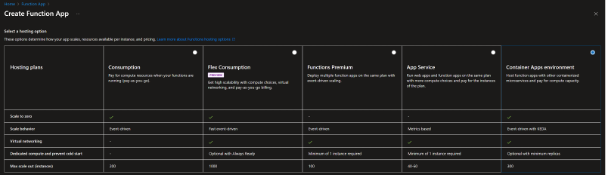
Flex Consumption plan: A new alternative
Recently, a new alternative has arrived: Flex Consumption. This plan is currently still in a preview phase. It should be seen as a modernized version of the Consumption Plan solution, with all the benefits of the Premium Plan, including:
- The ability to offer Always Ready instances to reduce Cold Start effects
- The ability to integrate with an existing VNET with VNET integration and make it publicly inaccessible
- The ability to configure scalability for each Azure Function
- Support for OpenTelemetry to improve function Observability
In the Flex Consumption plan, Microsoft has reimagined the technical infrastructure of traditional functions through a project called Legion. What’s interesting about this architecture is that it’s ISO compatible with the Kubernetes Pod API specifications.
One of the main advantages of this architecture is its billing model. Except for the use of Always Ready instances, which are billed at a fixed monthly rate, consumption is mainly calculated on the basis of runtime and number of instantiations.
Currently in the Preview phase, the Flex Consumption plan is not yet available in all Azure regions (e.g. West Europe and France Central). As a result, the public price is not yet official. The page detailing Azure Functions Service pricing indicates that the cost of the Flex Consumption plan is only slightly higher for the runtime billing criterion (€+-0.000003/GB-s).
This option is less attractive than the Consumption plan in terms of runtime quotas and free instantiations, which may have an impact on intensive users of Azure Functions, particularly for PowerShell scripts, for which the monthly cost can be as low as a few euros on the Consumption plan.
However, the Flex Consumption plan still has some limitations that preclude its adoption in certain use cases, including:
- Not available in certain key regions (West Europe, Central France)
- Still in the Preview phase
- No support for containers (for now)
Among these constraints, the last is particularly crippling, especially in a context where containerization is becoming increasingly important. A more Cloud-native approach is needed. Fortunately, an alternative exists in the form of Azure Container Apps. Already using containers with the Premium plan, the transition to Azure Container Apps has proven to be smooth and efficient.
Why host your Azure Functions on Azure Container Apps?
Choosing Azure Container Apps for its Azure Functions has several advantages:
- The infrastructure is similar to that of Flex Consumption, based on the Legion project, but for containers and still in serverless mode with support for Workload profile environments in Consumption only.
- Network isolation is simplified and managed at the Container Apps environment level.
- You can benefit from components such as Kubernetes-based Event Driven Autoscaler (Keda) for scaling functions with events.
- A more Cloud-Native approach to observability, with support from OpenTelemetry & Aspire.
For users new to containers, you’ll need to create an image with DockerFile, using a PowerShell image, for example. Since September 2024, we’ve had a PowerShell 7.4 worker on a Debian 12 base. To keep up to date with the latest releases, click here (link: https://github.com/Azure/azure-functions-docker).
Creating and deploying Azure Functions in Azure Container Apps

For the DockerFile, we suggest working with Azure Functions Core tools. In an empty directory dedicated to this purpose, let’s start by creating the structure for our Azure Function with the following command:
func init MonProjet –worker-runtime PowerShell –docker –managed-dependencies
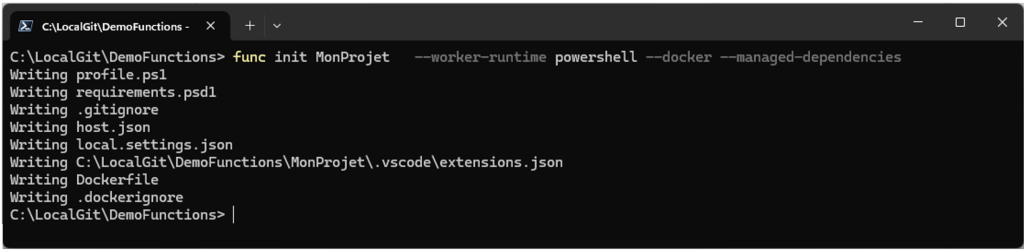
The result is a customizable DockerFile. It’s best to externalize the version of the image to use so you can more easily control which version of the image will be used for PowerShell.
ARG FUNCTION_IMAGE_TAG
FROM mcr.microsoft.com/azure-functions/powershell:${FUNCTION_IMAGE_TAG}
ENV AzureWebJobsScriptRoot=/home/site/wwwroot \
AzureFunctionsJobHost__Logging__Console__IsEnabled=true
COPY . /home/site/wwwroot
Finally, all that remains to do is to create the Azure Functions from VSCode or the command line, as shown below :
func new –name ActivityLog_HTTP –template “HTTP trigger” –authlevel “function” –worker-runtime PowerShell

For details on PowerShell development with Azure Functions, check out the Azure Functions PowerShell developer guide, which will explain all the finer points of configuration.
Next step: build our image. This operation can be done locally with Docker or moved directly to our Azure Container Registry instance with the following command line:
az acr build –registry nprdacr –image demonfunction:1.0.0 . –build-arg ‘FUNCTION_IMAGE_TAG=4.0-powershell7.4’

What’s great about this process is that it can easily be integrated into a build pipeline, whether with Azure DevOps or GitHub Actions, depending on your preferences. Once the build is complete, all that’s left to do is deploy. This deployment can be managed directly from the Azure portal, in our Container Apps environment. The portal’s intuitive interface makes it easy to find your way around.

However, to take full advantage of all the possibilities, this step can also be done via the command line, as illustrated below:

Still, these solutions alone aren’t sufficient to industrialize the deployment of our functions. We need to configure additional environment variables for our functions. To learn more, I recommend reading through this well-made repository: Azure-Functions-on-container-apps. You’ll learn how to automate deployment with Bicep.
On the DevOps side, here are a few helpful resources:
- The azure/container-apps-deploy-action action for GitHub Actions
- The AzureContainerApps task for Azure DevOps
What’s more, with the Legion project, which is ISO-compatible with the Kubernetes Pod API specifications, considering the native use of YAML is possible. After some research, it turns out that this is indeed under development: Azure Container Apps ARM and YAML template specifications. However, at the time of writing, Azure Functions is not yet supported.
What’s different from Azure Functions on Container Apps?
At the time of writing, Azure Functions on Container Apps has been in GA (General Availability) since May 2024, but some limitations and differences are still worth noting. These include:
- Although Diagnostic Settings are available for the Azure Container Apps environment, they’re not yet available for Azure Function. This is due to a different underlying infrastructure. Microsoft is currently working on this, notably by integrating OpenTelemetry support into Azure Application Insights.
- So far, Application Insights’ autoinstrumentation feature isn’t compatible with the PowerShell worker, which remains a favorite.

The consequence of this shortcoming is evident when attempting to consult our Azure Functions invocations. It looks empty.
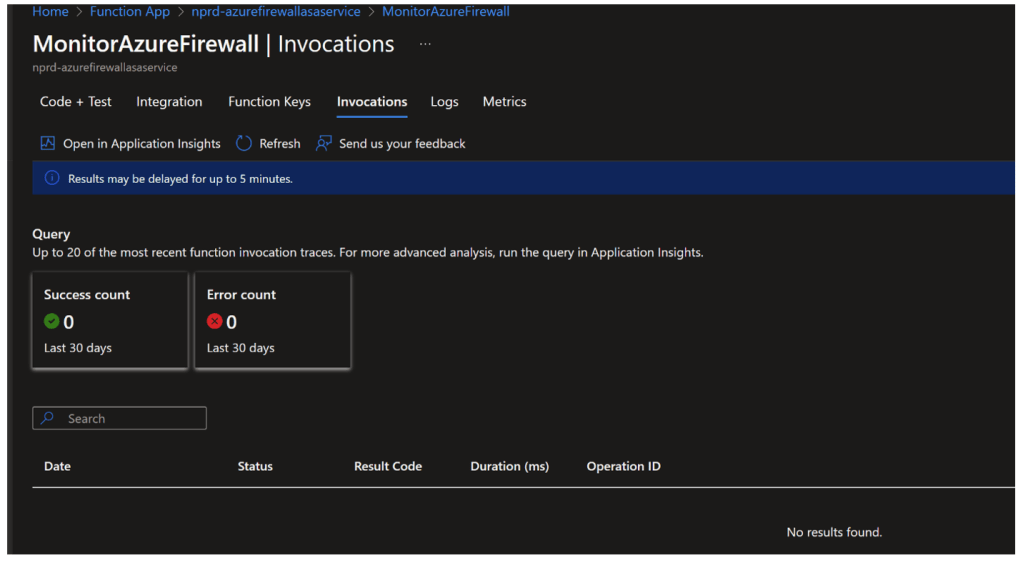
After some investigating, it seems that this feature isn’t supported for PowerShell yet. In the meantime, there is a solution: Azure Container Apps natively integrates the .NET Aspire Dashboard. Simply activate this option to benefit from this dashboard.

Conclusion
With its General Availability (GA) launch in late May 2024, Azure Functions on Container Apps is still a recent solution, which explains the few limitations and constraints observed. That said, the Azure Container Apps environment offers a great deal of flexibility by allowing multiple Azure Functions to be isolated within a dedicated VNET, simplifying configuration compared to Private Endpoint or VNET Integration use.
In terms of performance, Azure Container Apps offers optimized instances, with a notable improvement in Cold Start management thanks to the ability to configure instances as Always Ready.
Finally, another significant advantage is that the Azure Container Apps environment can be reused for a variety of purposes. Personally, I often use Azure Container Apps Jobs paired with Keda (Kubernetes Event-driven Autoscaler) to deploy GitHub Action Runners on demand. I’ll expand on this topic in an upcoming article dedicated to Azure Container Apps.
A few links for further reading
In the meantime, here are a few links to explore :