
Developed by GitHub and OpenAI, professionals are calling GitHub Copilot a “revolutionary tool for developers,” since it combines Artificial Intelligence...
28 November 2023
Lire cet article en Français
How to Create an Azure IoT Edge Module?

Post co-written by Taha Snoussi and Jérémie Lalanne.
We’ve been hearing more and more about Azure IoT Edge for a while now. This is a service that supposedly makes it easier to manage, develop, and maintain fleets of Internet of Things (IoT) devices worldwide. But What Is It? How Do You Use It?
We’re going to look at this technology today.
What Is Azure IoT Edge?
Azure IoT Edge, which came straight out of Microsoft’s labs a few years ago, is a service used to modernize IoT installations and software in industry. It lets you containerize device application workloads so they can be fully controlled and updated remotely from anywhere in the world. This makes maintenance much easier (since very little work needs to be done on-site) and facilitates the development of new features.
What Makes It Better than Classic Azure IoT?
The Azure IoT Hub service, the IoT device manager that lets you do the following globally:
- manage devices remotely
- group incoming messages
- communicate with devices
- connect different services
- manage new device provisioning
- internalize device configuration management
- etc.
In addition to other things, devices can use these services to exchange information, particularly thanks to the Azure IoT software development kit (SDK). Azure IoT Edge is an additional feature of Azure IoT Hub, a sub-service. The devices also use the Azure IoT SDK but do so differently and may have additional features. One important thing that Azure IoT Edge also lets you do is dynamically control the behavior of the device and the apps running on it remotely. There is no need to go on-site to replace the device, update it, maintain the software, or debug it.
What Limitations Does IoT Edge Have?
The main limitation remains the random-access memory (RAM). Containerizing applications is resource-heavy. For example, it’s difficult to do so on a battery-powered system that needs to last for a long time. It also makes software and development more difficult, but once you understand its concept, it is easy to grasp.
Example scenario
Let’s set up an example scenario for this post to show you how to build your first Azure IoT Edge solution. Let’s look at the really simple example provided by Microsoft as standard: a system with two IoT Edge modules: an off-the-shelf module (which generates random temperature data and is publicly available on Microsoft sources without source code), and a so-called custom module, which is one we build ourselves and is responsible for forwarding on the data from the temperature module to Azure IoT Hub.
Global Architecture Example

Figure 1: Simple Azure IoT Edge architecture (source: Quickstart: Deploy your first IoT Edge module to a virtual Linux Device | Microsoft Learn)
You need two Azure services to run an Azure IoT device:
- Azure IoT Hub (global management)
- Azure Container Registry (Docker image storage)
As a result, the Azure IoT Edge service and our temperature sensor module are already installed on the device. To this, we’ll add the custom module we will use to send temperature data to the Azure IoT Hub.
We looked at the architecture of an IoT Edge device in a previous post.
It’s important to remember that each module is a virtualized version of its associated function within a Docker container image. So how does it work?
Hardware Architecture Example
Let’s start with a Raspberry Pi. This is simple and very common nowadays.
As previously stated, running Azure IoT Edge takes a lot of resources. For example, if the device only has one to three extremely simple modules, it will need a minimum of 2 GB of RAM (sometimes less, sometimes more, it’s difficult to estimate). However, 4 GB of RAM is advised for a smooth performance with heavier workloads.
For this example, we will use a Raspberry Pi 4 with at least 2 GB of RAM. The Raspberry Pi 3B+ would also work, but it will quickly reach its limits as the load increases.
You can also use more advanced technologies like Azure Sphere or Windows IoT Core. This is the intermediate abstraction layer between the hardware and our application.
Conventional or Modern Development Approach
We could develop a monolithic application that retrieves the temperature from the sensor and sends it directly to the Azure IoT Hub via an application programming interface (API). This may seem like the obvious choice at first glance. But let’s say we want to add another feature to our device, such as near-real-time processing of temperature alerts, program modification based on data from nearby presence sensors, and a host of other features. We would have to redevelop everything to make this new code work with the existing code, and that’s before we even think about global deployment.
When we build a Hogwarts Lego® set, a piece might break (even though we all know Lego® never breaks) or be faulty (again, doesn’t happen) and need to be replaced with a new piece or something better. Either way, we don’t want to have to recommend a whole new set. Azure IoT Edge lets us do that, and that’s what a containerized architecture is all about. When a feature crashes or we just want to improve it, replace it, or make it more stable, we can do that. After all, they are just containers. They are, by their nature, independent from one another. So, we don’t have to worry about the other tasks when it comes to developing Azure IoT Edge modules. We can develop them individually and in a different language if we want to. The same is true for deployment. You don’t have to worry about whether it will work well with everything else.
How an Azure IoT Edge Module Works
An IoT Edge module is a container started by the IoT Edge runtime through a “deployment manifest” configuration file. The runtime comprises the Edge Hub and Edge Agent system modules. These manage communication between the various modules and the IoT Hub and the operation of all modules, respectively, and ensure they all comply with the manifest content.
The manifest tells the containers what execution context to use:
- The environment variables specific to each container (plus a few rare ones inherited from the runtime).
- The exact configuration when the device is deployed. This will enable it to access certain features of the host operating system, such as:
- Sensor drivers
- Network sockets
- Data storage space
The module itself must meet certain requirements to interact with the system modules and other elements. For example, it must be configured to behave in a certain way during IoT Edge-specific interactions, such as what to do when it receives a message from another module or a remote method call (direct method).
Communication Types
D2C/D2D
This is how the custom module will send data received from the temperature module to the IoT Hub in the example in this post. Almost all the messages the device can send to the IoT Hub fall into this category. This is one of the key features of the Edge Hub module.
What About C2D?
This type of communication is challenging to consider, so we rarely talk about it. In practice, Azure IoT Edge does not actually send a message. Rather, it initiates a series of communications. Either the IoT Hub sends configurations (or rather, the Edge Agent module senses that there is a difference and requests the new manifest), or it uses direct methods.
Direct Methods
This is a well-known principle and a popular and widely used feature. A direct method involves remotely calling a specific function on the device. Alternatively, you could say it means asking the device to do something. Taking into account these capabilities will be one of the things that goes into configuring the module during development. For example, in our scenario, it will mean adding the ability for the module to change the temperature threshold before sending an alert or the send frequency if asked to by the IoT Hub or another module (or even a device).
First Steps in Development
Microsoft provides detailed documentation on developing IoT Edge modules and gives examples of implementing them. Let’s look at more examples of modules you can implement quickly.
Tools
Following the basic rules for developing Azure IoT Edge modules recommended by Microsoft, we’re using Visual Studio Code for our example. It has all the functions you could need for this development type. You will also need to install the Azure IoT Edge for Visual Studio Code extension and Docker on your workstation.
Creating a Solution
The previously installed extension gives us access to a palette of useful commands for developing and controlling remote devices.
To open this palette and create a new Azure IoT Edge solution:
View > Command Palette (Ctrl + Shift + P)
Next, choose to create a new solution using the extension below:

The menu will also give you the option to create a new module within that solution and pick the technology to use and where to store it (locally by default). Let’s begin with a C#.NET module.
This tree structure is what you’ll usually get:
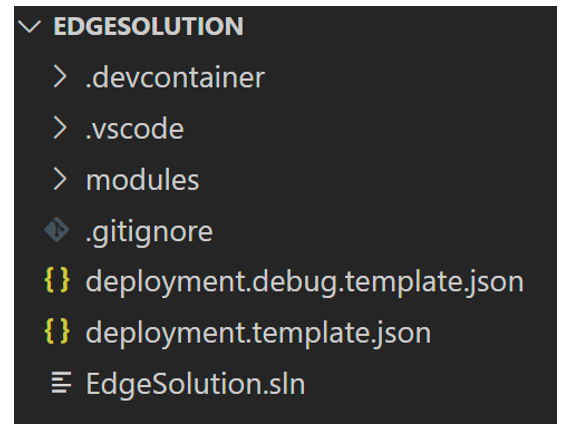
Remember Azure IoT Edge is a fairly new technology that can evolve in many ways, affecting what we consider the best architecture for module development. Because of this, the extension is often updated with new ways of doing things, which might be different from the method we’re going to look at today, depending on when you read this post.
The two versions of the manifest we discussed earlier are in the deployment.debug.template.json and deployment.debug.template.json files. They are provided so you can test the module locally or individually, or as an example to make it easy to get the format the runtime modules need: Edge Agent and Edge Hub.
The modules folder contains as many folders as modules to be developed within this solution. As standard, there is a SampleModule folder with this default tree structure:

As you can see, this module has numerous Docker files you can use to compile it.
You’ll also find the structure for a .NET project using the aziotedgemodule project template. This project implements a long-running service (see the Microsoft documentation to find out more).
Microsoft introduced this .NET project type in .NET 6. The example projects used the console template before this version. However, there was nothing stopping you from using other templates that were available at the time, such as the API and webAPI templates.
Developing a New Web-Based Module
If you want to create your own module of a different type within this same solution, you can go to the modules folder, open a console, and run this command (many additional parameters are available):

Use the ‘dotnet new list’ command to find out which project types the .NET framework supports:

Next, create the Docker file for the new module. We won’t be able to use the DockerFile files from the existing SampleModule because the project type selected in the previous command was “web.” Unfortunately, Microsoft does not yet offer a Docker file creation option with the .NET SDK in this context (as we said, the technology is still quite new, and many improvements are still to come).
We suggest you use the Docker tool (version 4.23.0) to make the process easier and faster. Place your console in the WebModule folder and run the ‘docker init’ command.

Note: docker init only works with the “web API” project type.
You will need to use a different Docker file if you choose the “console” project type. We suggest using the following, where ConsoleModule is the module name:
The long-running service is a key component of the aziotedgemodule template recommended by Microsoft for IoT Edge modules. You can instantiate a worker service that inherits from a BackgroundService with this template. It adds injection of your workers service into the .NET host using the AddHostedService method.
To activate certain features of the Azure IoT Edge template, you need to overload the ExecuteAsync method by adding tasks to implement responses when the IoT Hub invokes direct methods or the processing of messages received by the module.
If you selected a different .NET project template, you can still use the same strategy: create a class for your module and instantiate it within the .NET execution host. Your class could be:
- ModuleBackgroudService as follows:
- IHostedService as follows:
Then, do the following to add this service to your .NET host:
More about Azure IoT Edge
The development possibilities are huge with Azure IoT Edge, simply by making each “Lego®” brick independent from the others. Whether you’re building web applications or incorporating artificial intelligence modules (a topic for a future post). You decide what you need.
Have a read of our other posts on IoT topics as well.
Do you need help with your IoT project? Contact us!